

Security Dogma is reader-supported. When you buy through links on this page, we may earn a commission at no extra cost to you. As an Amazon Associate I earn from qualifying purchases. Learn more
Quick answer
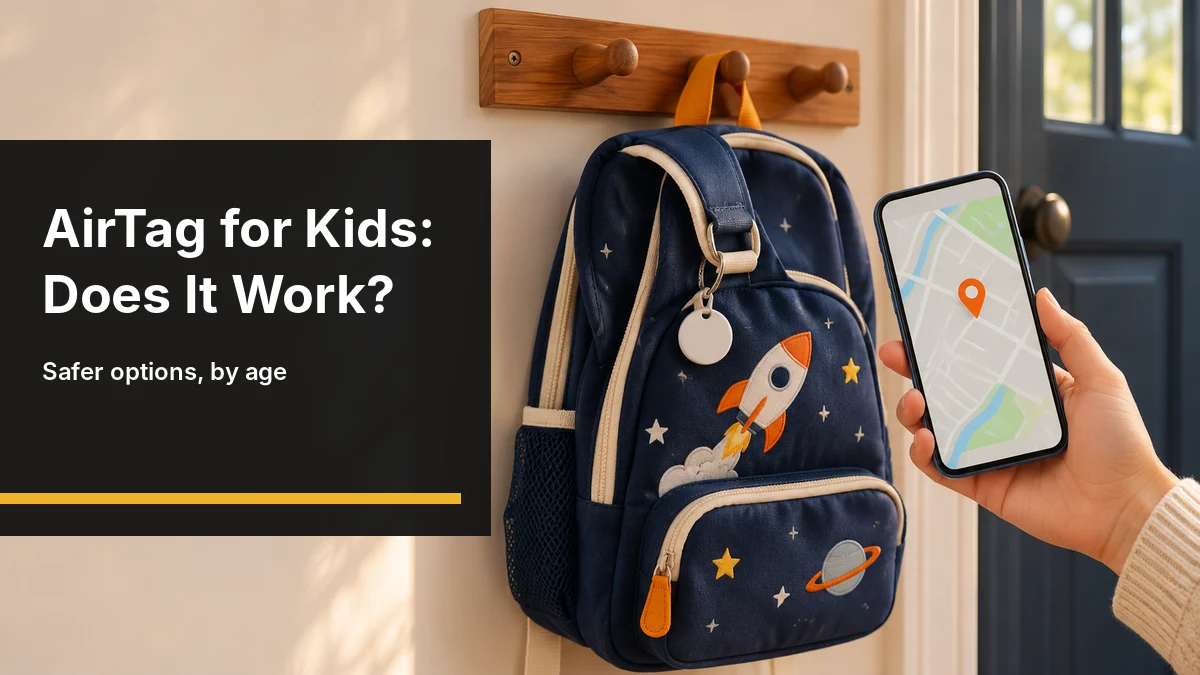
Yes, you can put an AirTag on your child’s backpack or wrist. In a crowded place full of iPhones, it will usually show you roughly where they are. But Apple says AirTag is “designed exclusively for tracking objects,” and it behaves that way. It has no live tracking, no alert when your child leaves a safe area, and no SOS button. It can also beep or alert strangers when your child is away from you. As a backup for a day out, it’s reasonable. For a child who wanders, or for everyday independence, use a GPS tracker or a kids’ watch instead.
Key takeaways
- An AirTag shows where your child’s tag was last seen by a nearby Apple device. It doesn’t show where your child is right now.
- It works best in busy places like theme parks, airports, and stadiums. It works worst in quiet neighborhoods, parks, and rural areas.
- AirTag has no geofence alerts, no SOS button, and no calling. Real GPS trackers and kids’ watches have some or all of these.
- For a child who wanders, or a child with autism or special needs, an AirTag isn’t enough. Look at AngelSense or Jiobit.
- AirTag runs on a coin battery that can cause severe internal burns if swallowed. On toddlers, use a holder that closes with a screw.
This advice is for parents and legal guardians tracking their own minor children. Never use a tracker on another adult, an ex-partner, or anyone without their consent.
Safety first: No tracker, watch or app replaces adult supervision, a family safety plan, or teaching your child what to do if they get lost. Location devices can fail because of dead batteries, weak signal, settings, or the device being removed. Never rely on a single device for your child’s safety.
Prefer to watch? This video covers the same ground in about six minutes.
This video is hosted by YouTube (Google). Loading it shares your IP address with Google and may set cookies. See our Privacy Policy.
This video was made with AI tools and summarizes this guide. Scenes are illustrations, not real events.
AirTag vs. GPS trackers vs. kids’ watches
Every row below comes from the manufacturer’s own pages or a named testing outlet. Features change, so confirm on the brand’s site before you buy.
| Device | How it locates | Real-time? | Geofence alerts | SOS button | Calling | Needs subscription | Best for |
|---|---|---|---|---|---|---|---|
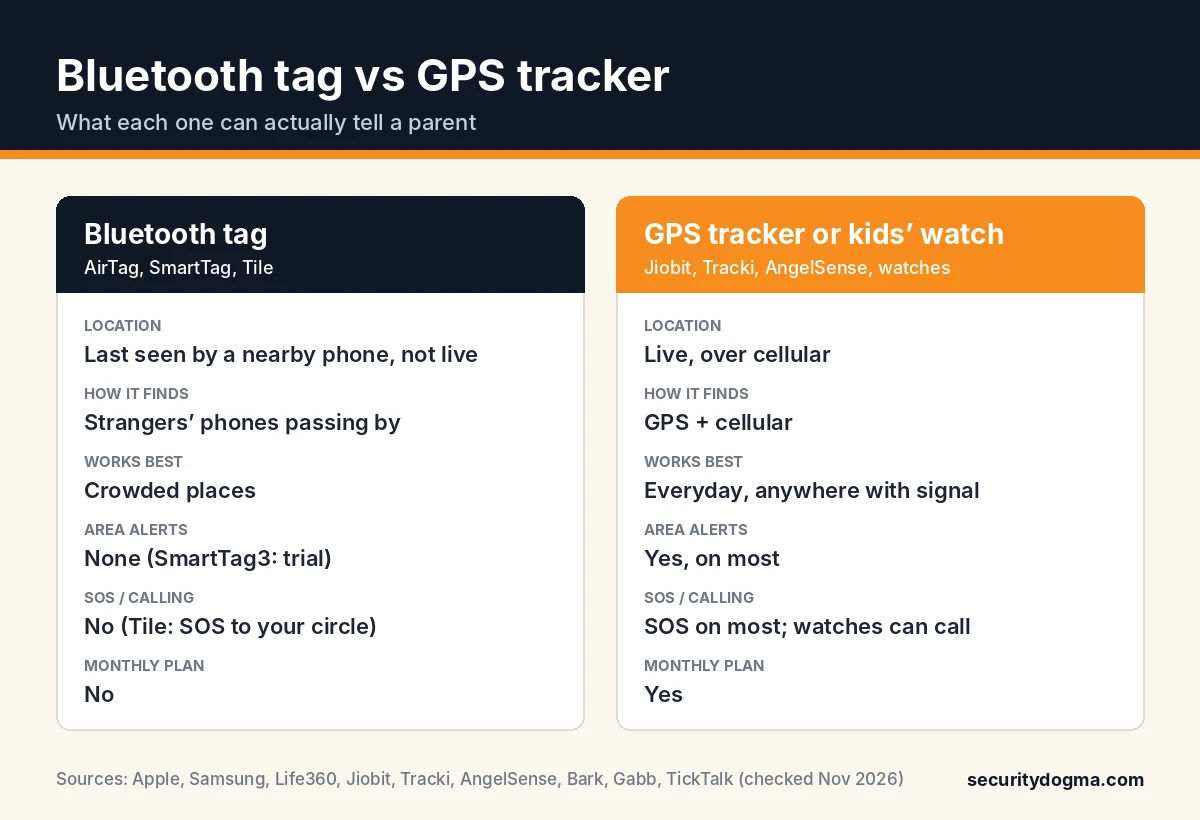
| Apple AirTag | Bluetooth, relayed by nearby Apple devices (Find My network) | No, last-seen location | No | No | No | No | iPhone families, crowded day trips, backup tag |
| Samsung Galaxy SmartTag3 | Bluetooth, relayed by nearby Galaxy devices (Galaxy Find Network) | No, last-seen location | Trial “Place Notification” (alerts when the tag moves in or out of an area) | No | No | No | Galaxy families; also works with iPhone (some features Galaxy-only) |
| Tile (Life360, 2024 lineup) | Bluetooth, Tile/Life360 network | No, last-seen location | No | Yes (press 3 times, alerts your Life360 Circle) | No | No | Mixed iPhone/Android families |
| Jiobit Smart Tag | Cellular + GPS + Wi-Fi + Bluetooth | Yes | Yes | Yes (alert button) | No | Yes | Young kids, kids who shouldn’t carry a phone |
| Tracki | Cellular + GPS, Wi-Fi indoors | Yes | Yes | Yes | No | Yes | Budget GPS, travel |
| AngelSense | Cellular + GPS | Yes | Yes, plus routine-based alerts | Yes | Yes (auto-answer voice) | Yes | Autism, special needs, kids who wander |
| Kids’ GPS watch (Bark Watch, Gabb Watch, TickTalk 5) | Cellular + GPS | Yes | Some (Gabb Watch) | Yes | Yes | Yes | Ages about 5–12, first step before a phone |
Does an AirTag work for kids?
Short answer: it works as a rough “where did they go” tool in busy places. It can’t tell you where your child is moving right now.
AirTag doesn’t have GPS. It sends out a Bluetooth signal, and any nearby Apple device in the Find My network quietly reports the tag’s position to you, end-to-end encrypted. That has three consequences for a parent:
- The location is a snapshot. You see where the tag was last picked up and when. If your child is moving, you’re looking at the past.
- It depends on the crowd. At a theme park, plenty of iPhones pass by. On a quiet trail, there may be none for a long time.
- Close up, it’s excellent. Precision Finding uses Ultra Wideband to point you to the tag with an arrow and a distance. Apple says the second-generation AirTag (2026) works up to 50% farther away than the first. That range needs a compatible iPhone: iPhone Air, or iPhone 15 or later, excluding the 16e and 17e. Apple says its speaker is also 50% louder.
What Apple itself says matters here. When AirTag launched, an Apple vice president said it was made to track items, not children or pets, and suggested an Apple Watch with Family Setup for kids. Apple’s 2026 launch announcement repeats that AirTag is for objects only.
The catch most parents don’t expect
AirTag’s anti-stalking features don’t know the person carrying it is your child.
- It can trigger alerts. If the AirTag is separated from your iPhone and moves with someone else, their phone may get an unknown-tracker alert. That someone could be a teacher, a bus driver, or a friend’s parent. The tag can also start making a sound.
- Your child’s phone may alert too. If your child has their own iPhone, they may get the alert themselves. Apple doesn’t allow sharing an AirTag with a child account.
- Other parents can share it. You can share one AirTag with up to five people, such as a co-parent or grandparent, as long as each has their own adult Apple Account.
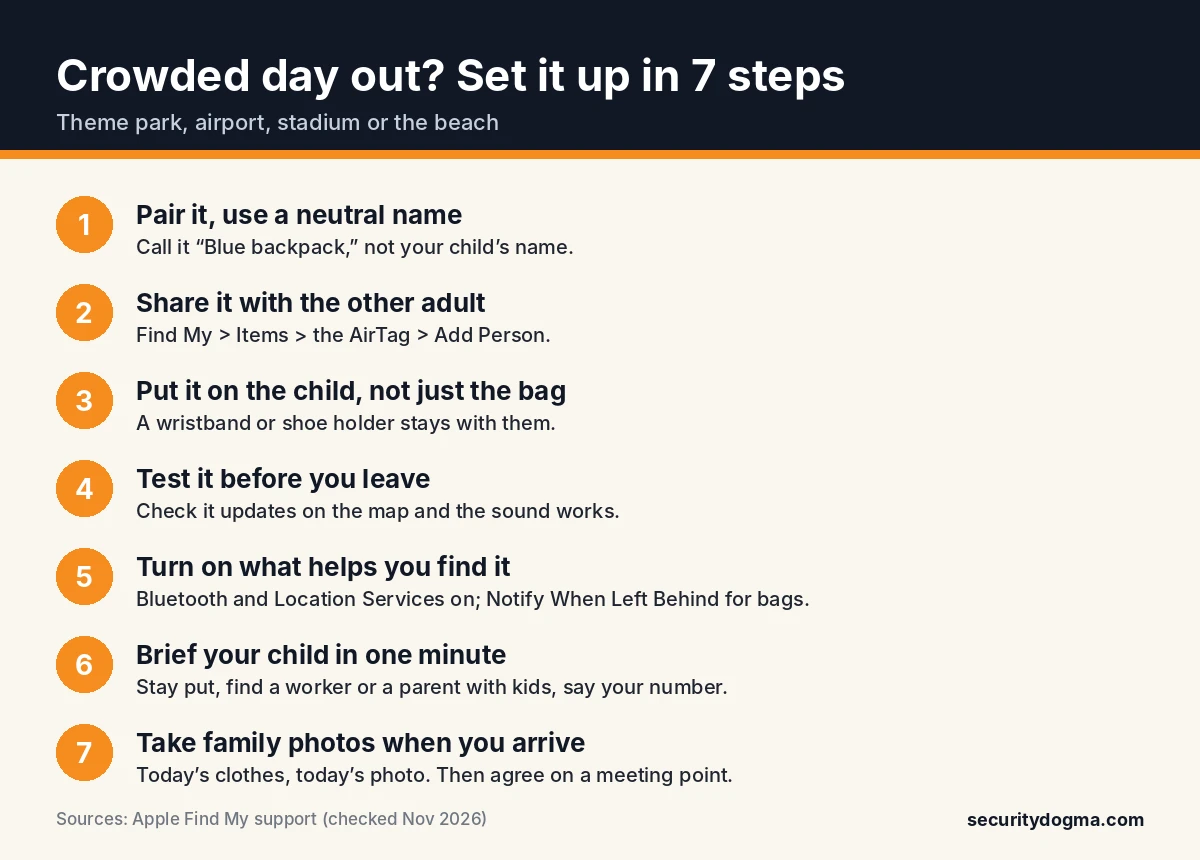
Heading somewhere crowded today? Set it up in 10 minutes
Theme park, airport, stadium, first day of school: here’s a setup you can do this morning.
- Pair it and give it a neutral name. Bring the AirTag close to your iPhone and follow the prompts. Call it “Blue backpack,” not your child’s name.
- Share it with the other adult. In Find My, go to Items, choose the AirTag, then Add Person. The other parent can then see it and play its sound.
- Put it on the child, not just the bag. Kids put bags down. A tamper-resistant wristband or a shoe insert stays with them. A backpack case is fine for school days.
- Test it before you leave. Walk out of Bluetooth range with the tag, or have the other adult take it. Check that it updates on the map and that its sound works.
- Turn on what helps you find it. Keep Bluetooth and Location Services on. In the AirTag’s settings, turn on Notify When Left Behind if you also tag a bag.
- Brief your child in one minute. If you get separated, stay where you are, find a worker with a name badge or a parent with kids, and say your parent’s phone number. Write the number on their arm or on a wristband card.
- Take family photos the moment you arrive. This is my own habit. Whenever we get somewhere crowded, from the beach to a big event, I take a few family photos right away. It gives me peace of mind to have the most up-to-date picture of my kids, showing exactly what they’re wearing, in case one of them gets lost. Then we agree on a meeting point.
Free printable: Crowded Day Tracker Checklist (PDF)
One page: the 10-minute setup, what to do when you arrive, a “found a tracker” checklist, and two cut-out “If I get lost” cards for your kids. No email needed.
Or copy this into your phone’s Notes, or send it to the other parent:
CROWDED DAY TRACKER CHECKLIST
Before you go:
[ ] Pair the tag with a neutral name ("Blue backpack", not your child’s name)
[ ] Share it with the other adult (Find My > Items > Add Person)
[ ] Put it on the child, not just the bag (wristband or shoe insert)
[ ] Toddlers: holder that closes with a screw (coin battery is dangerous if swallowed)
[ ] Test it: map updates and sound works
[ ] Bluetooth + Location on; Notify When Left Behind if you also tag a bag
[ ] Brief your child: stay put, find a worker with a name badge or a parent with kids, say my phone number
When you arrive:
[ ] Take a family photo (what everyone is wearing)
[ ] Agree on a meeting point
[ ] Write your phone number on their arm or a card
Full guide: securitydogma.com/home-safety/airtag-for-kids/
Products for this situation:
- A tamper-resistant AirTag wristband for kids. Look for one that closes with a screw, and check the listing says so.
- An AirTag shoe holder, for kids who pull off wristbands.
- A backpack case with a screw or locking closure.
Apple AirTag
Bluetooth item tracker · Find My network · Precision Finding on compatible iPhones · user-replaceable CR2032 battery
A good backup tag for crowded day trips and for the things kids lose. Check the listing for the generation you’re buying.
Watch out for: it shows a last-seen location, not live tracking, and it can alert people who carry it away from you.
See current price →Paid link · opens Amazon.com
Samsung Galaxy SmartTag3
Bluetooth item tracker · Galaxy Find Network · works with Galaxy phones and iPhone (some features Galaxy-only)
Samsung says it also works with iPhone, and a trial Place Notification feature can alert you when the tag moves in or out of an area you set.
Watch out for: location still depends on nearby Galaxy devices, so it can be delayed.
See current price →Paid link · opens Amazon.com
Tile (Life360)
Bluetooth tracker · works with the Life360 app on iOS and Android · SOS on the 2024 lineup (press 3 times to alert your Life360 Circle)
Works across both phone platforms, so the whole family can use one app.
Watch out for: like any Bluetooth tag, it shows a last-seen location, not live tracking.
See current price →Paid link · opens Amazon.com
Toddlers and coin batteries. AirTag runs on a CR2032 coin battery. Apple warns that the tag, its battery cover and the battery can be a choking hazard for small children. Both Apple and the U.S. Consumer Product Safety Commission warn that a swallowed coin battery can cause severe chemical burns within about two hours. For a toddler, use a holder that closes with a screw, and check it each morning. If you think a battery was swallowed, get emergency medical help right away.
Worried your child could wander or go missing?
If your child is missing or you believe they are in immediate danger, call 911 (or your local emergency number) right away. Don’t wait for a tracker to update.
Short answer: an AirTag is not enough here. Use a cellular GPS tracker that alerts you and updates continuously.
When a child leaves on their own, the first minutes matter most. An AirTag can’t tell you the moment your child walks out of the yard. It can’t update every few seconds while you search, and it gives your child no way to call for help. In a quiet neighborhood, it may not update at all until a stranger’s iPhone happens to pass.
Two devices are built for this situation:
- AngelSense is made for children with autism and special needs. The company describes alerts that learn your child’s routine and flag unexpected places, a search mode with fast updates, and voice that auto-answers so you can talk to a child who can’t pick up a call. It also offers a listen-in feature, and the device is designed so the child can’t easily remove it. It needs a service plan. A SafeWise review named it a top pick for kids with special needs.
- Jiobit Smart Tag (from Life360) is tiny and clips onto clothing or a bag. Jiobit says it uses cellular, GPS, Wi-Fi and Bluetooth for real-time location, with alerts when your child arrives at or leaves trusted places. It needs a monthly plan.
Pair either one with a written plan for what everyone does in the first 10 minutes. The tracker tells you where. The plan tells everyone what to do.
Security Dogma does not give medical or therapeutic advice. Talk to your child’s doctor or care team about wandering and safety plans.
Which one should you buy?
Short answer: choose by age and how much independence your child has, not by price alone.
- Day trips only, everyone on iPhone: AirTag plus a wristband.
- Mixed iPhone and Android household: Tile.
- Young child, real-time location, no screen: Jiobit Smart Tag or Tracki. Tracki also has an SOS button.
- Ages about 5–12, ready to call you: a kids’ GPS watch. Bark Watch: Bark lists calling, texting, location in the Bark app, an emergency call option that can reach 911, and content monitoring. Gabb Watch: Gabb lists calling, texting, GPS, Safe Zone alerts and up to 100 approved contacts. Its SOS button calls the child’s SOS contact, not 911. TickTalk 5: TickTalk lists video calling, GPS location, an SOS button and direct 911 calling.
- Special needs or wandering: AngelSense.
- Older kids ready for a phone: look at limited “first phones” like Bark Phone, Gabb Phone, Troomi or Pinwheel.
All of the GPS trackers and watches above need a monthly plan. Before you choose, read what the plan includes and what each brand says about the data it collects.
What I’d do as a father of three and a former PI
My job used to be finding people and things that didn’t want to be found. That taught me to plan in layers: one device always fails at the worst moment. As a dad, I also know the trade-offs aren’t only technical. A tracker on your kid is a family decision, and kids should know what they’re wearing and why.
I’ve used Life360 and Google Family Link on my own kids’ phones. Life360 was the easier of the two to use day to day. As my kids got older, some asked me to turn it off and some didn’t care. I respected that and removed it for the ones who asked. Looking back, I think I should have kept it and sat down with them to explain why it matters. That’s my main advice: make family security something you do together. Explain the reason, agree on the rules, and build trust that way.
Here’s the layered setup I’d use. These are my picks as a parent and an investigator. They’re not a professional assessment of your family’s situation.
- Toddlers (about 1–4). Layer 1 is your eyes, plus a bright shirt you photograph that morning. Layer 2 is your phone number on a wristband. Layer 3 is a tag in a holder that closes with a screw, because of the coin battery. My pick: Jiobit Smart Tag, clipped where little hands can’t reach. Use an AirTag in a screw-closed holder only as a backup for crowded day trips.
- Ages 5–9. Teach them what to do if they get lost, and practice it. Agree on a meeting point at every outing. My pick: a kids’ GPS watch, so they can call you. The Gabb Watch is the simpler choice. The TickTalk 5 adds video and direct 911.
- Ages 10–13. Give them more independence and talk openly about location sharing. Many kids this age do better with a limited first phone. My pick: Bark Watch, or a first phone with location sharing turned on with their knowledge.
- Special needs or wandering at any age. Combine a written wandering plan, door and window alarms at home, a care team that knows the plan, and a dedicated tracker. My pick: AngelSense.
At every age, keep a tag on the things kids lose, such as backpacks, instruments and suitcases. That’s the job AirTag was made for, and it does it very well.
Think someone is tracking your child?
If your child is missing or you believe they are in immediate danger, call 911 (or your local emergency number) right away. Don’t wait for a tracker to update.
Short answer: stay calm, find the device, document it before you disable it, and involve police if the tag isn’t explained by a borrowed item or a family member.
Most unknown-tracker alerts have an ordinary cause: a friend’s bag, a borrowed jacket, or a relative’s AirTag in a car seat. But an alert deserves a methodical check, and this is the part of the job I did for years.
What the alerts mean
Apple and Google built a shared standard, Detecting Unwanted Location Trackers. It means iPhones (iOS 17.5 and later) and Android phones (6.0 and later) can warn about compatible trackers from either platform that are moving with you. On iPhone the alert reads “[Item] Found Moving With You.” The alert only fires when the tracker is away from its owner, so a stranger’s AirTag on a crowded train won’t set it off.
How to check, iPhone
- Tap the alert. Find My can show a map of where the tracker moved with you. It can also play a sound on the tracker, or use Precision Finding if it’s supported.
- Keep Bluetooth on, Location Services on, and Tracking Notifications allowed for Find My. Without these, the iPhone can’t warn you.
- Search your child’s bag, coat pockets, car seat, stroller, and the linings and straps of each.
How to check, Android
- Open Settings, then Safety & Emergency, then Unknown tracker alerts, and tap Scan now. Google says a scan takes about 10 seconds. It lists trackers near you that are separated from their owner.
- Unknown tracker alerts work with Find Hub-compatible tags and Apple AirTags.
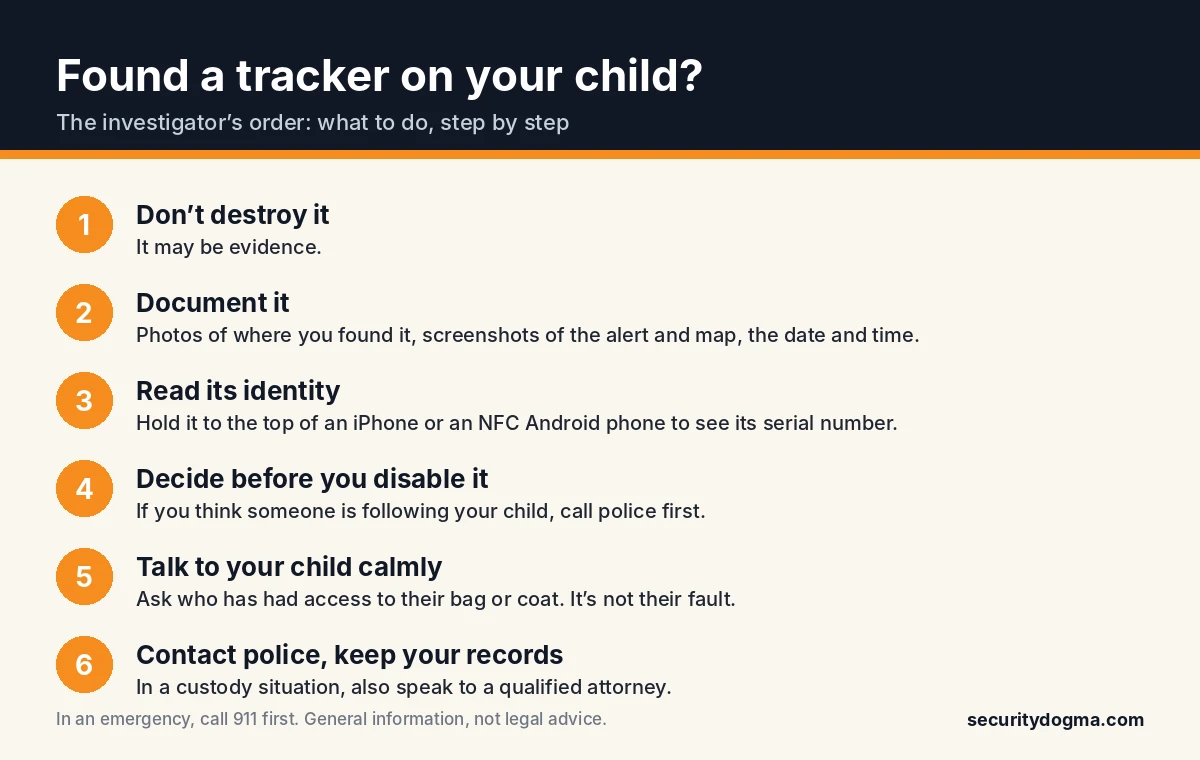
What to do when you find one: the investigator’s order
- Don’t destroy it. It may be evidence.
- Document it. Take photos of where you found it and the device itself. Screenshot the alert and the map. Write down the date and time.
- Read its identity. Hold an AirTag near the top of an iPhone or an NFC-enabled Android phone. You’ll see its serial number and, if it’s in Lost Mode, the owner’s message. Apple says that law enforcement can request account information from Apple.
- Decide before you disable it. Removing the battery stops its location reports, which the owner may notice. If you believe someone is following your child, call police first and let them advise.
- Talk to your child calmly. Ask who has had access to their bag or coat. Don’t make it their fault.
- Contact police and keep your records. If you share custody or know who placed it, also speak to a qualified attorney.
As a PI in California, any tracker request I handled was checked against state law before anything was placed. The rules are strict, and they apply to families too.
This is general information, not legal advice. Laws on tracking people and devices vary by state and country. If you share custody, or the situation involves another adult, check with a qualified attorney before tracking a child or device.
A tracker on your child that you didn’t place is a sign your family’s safety plan needs a second look. The Family Security Plan walks you through who can reach your kids, what happens in an emergency, and who calls whom.
Setup and privacy: who can see your child’s location
Whatever you buy, its location data shows where your child sleeps, studies and plays. Lock it down.
- Check who can see the location. List every adult with access in the app, and remove anyone who no longer needs it, such as an old babysitter or a previous phone.
- Protect the parent account. Use a strong, unique password and turn on two-factor authentication. Most tracker accounts are only as safe as the email behind them.
- Read the data policy. Check what the company stores, for how long, and whether it shares location with partners. Jiobit, for example, says its platform is COPPA compliant. Look for each brand’s own statement.
- Use neutral names. Name devices “Blue backpack,” not your child’s full name.
- Agree on the rules. For older kids, agree on when the tracker is on and who sees it. Trust works both ways.
Frequently asked questions
Can you put an AirTag on a child?
Yes, many parents do, usually in a wristband, shoe holder or backpack case. Apple says AirTag is designed for objects, not people. It shows a last-seen location reported by nearby Apple devices, with no live tracking, geofence alerts or SOS button. Treat it as a backup for crowded places, not your main safety tool.
How far away can an AirTag track my child?
There’s no fixed range. Close up, Bluetooth and Precision Finding guide you to the tag. Farther away, it updates only when another Apple device in the Find My network passes near it. In busy places that happens often. In quiet or rural areas it may not happen for a long time, so the location can be old.
Will my child’s AirTag beep or alert other people?
It can. If the AirTag is separated from your iPhone and moving with someone else, their phone may get an unknown-tracker alert, and the tag can play a sound. Teachers, bus drivers or your child’s own iPhone might see it. Sharing the AirTag with another adult’s Apple Account helps that person, but you can’t share with a child account.
Can my co-parent see our child’s AirTag too?
Yes. In Find My, open Items, pick the AirTag and use Add Person to share it with up to five people. Each needs their own Apple Account with two-factor authentication. Before sharing location in a custody arrangement, make sure both parents agree and check your custody terms.
Is it legal to put a tracker on my own child?
In general, parents and legal guardians may track their own minor children, but laws vary by state and country. Custody orders can add limits. This is general information, not legal advice. If you share custody or another adult is involved, talk to a qualified attorney before placing a tracker on a child or their belongings.
Is an AirTag or a GPS tracker better for kids?
For day trips in crowded places, an AirTag is cheap and has no subscription. For everyday safety, a GPS tracker or kids’ watch is better. These use cellular data to send live updates and alerts when your child arrives or leaves a place, and many have an SOS button. The trade-off is a monthly plan.
What’s the best tracker for a child with autism who wanders?
Look for continuous cellular GPS, alerts that don’t depend on you checking an app, and a device your child can’t easily remove. AngelSense is built for this. Jiobit is a smaller, simpler option. Pair either one with a written wandering plan, and ask your child’s care team for guidance.
What should I do if I find an unknown AirTag on my child?
Stay calm and don’t destroy it. Photograph where you found it, screenshot any alert, and note the time. Tap it with a phone to read its serial number. If you believe someone is following your child, call police before disabling it. If your child is in immediate danger, call 911 right away.
Bottom line: what to choose by situation
- Theme park, airport, crowded event: an AirTag in a wristband or shoe holder, plus a photo of your child that morning and a meeting point.
- Toddler: a screw-closed holder or a Jiobit Smart Tag. Never a loose AirTag.
- Child who wanders or has special needs: AngelSense. Don’t rely on an AirTag.
- Ages 5–12, ready to call you: a kids’ GPS watch.
- Found a tracker you didn’t place: document it, call police if it’s unexplained, then review your family’s plan.
Remember: no tracker, watch or app replaces adult supervision, a family safety plan, or teaching your child what to do if they get lost.
A tracker shows where your child is. A plan decides what happens next. Get The Family Security Plan
Keep reading: Best Personal Safety Devices · Home Security While on Vacation · Cruise Ship Safety Tips · How to Secure Your Home
Sources
- Apple Newsroom: new AirTag (January 2026)
- Apple: AirTag (2nd generation) tech specs
- Apple: AirTag safety and handling
- Apple and Google: unwanted tracking alerts in iOS and Android (May 2024)
- Google: Android unknown tracker alerts
- U.S. CPSC: Apple AirTag battery warnings (2025)
- Samsung Newsroom: Galaxy SmartTag3
- Life360: how Tile trackers work
- Jiobit: Smart Tag
- AngelSense: product overview
- Gabb: kids watch SOS feature
- Bark: Bark Watch
- TickTalk: TickTalk watch
Checked November 27, 2026. Product features, apps, subscriptions and policies change often; confirm details on the manufacturer’s official site before buying. Apple, AirTag, Find My, iPhone and all other product and brand names are trademarks of their respective owners. Security Dogma is independent and is not affiliated with, sponsored or endorsed by any brand mentioned.
Legal disclaimer: This page is for general information and education only. It is not legal advice, and reading it does not create an attorney-client relationship. Security Dogma is not a law firm. Laws, licensing rules and court decisions vary by state and change often, and what is written here may not match your situation or be current when you read it. Before you act on anything here, check the official rules from your state licensing agency, follow your employer’s and client site’s policies, and talk to a licensed attorney in your state for legal questions. See our Terms and Conditions and how facts are checked in our Editorial Policy.