


Security Dogma is reader-supported. When you buy through links on this page, we may earn a commission at no extra cost to you. As an Amazon Associate I earn from qualifying purchases. Learn more
Security work is often treated as a dead end. It doesn’t have to be. I started as an entry-level guard and worked nightclub doors, executive protection, private investigations and security management before moving into IT management. The lessons I learned on the door are the same ones I use today to decide who gets into a company’s systems, which the IT world calls Zero Trust. Here’s how those lessons carried over, and how you can use yours to move into better-paid work, in security or any other field.
Quick answer
- Can security work lead to a higher-paying career? Yes, if you treat it as training. The skills carry into supervision, management and other fields.
- Skills that transfer: reading people, calm decisions under pressure, clear reports, holding a standard, and thinking in terms of risk.
- My path: guard and door work, then executive protection, private investigations, security management, and IT management.
- Proof: five door lessons map directly onto Zero Trust, the way IT teams control access.
- First step: take on the reports, training and incident reviews at your post.
My path from the door to IT management
From the field — Yair Arad
I started as an entry-level guard and armed officer. From there I spent about four years on nightclub doors, worked large events and loss prevention, spent about three years in executive protection, and spent five years as a private investigator, including owning my own firm. After that I spent about three years in security management and supervision for large telecom companies, and I also managed a security company. That security career is what led me into IT.
I didn’t leave those skills behind when I changed fields. I still use them every day.
These days I don’t stand at a door. I manage IT, and a big part of my job is deciding who gets into the company’s systems and what they can reach once they’re in: single sign-on, access rules, device standards, and approving changes before they go live. The tools are different. The decisions are mostly the same ones I made on the door.
The skills that carry over to any career
- Reading people and situations early. This is useful in management, sales, negotiation and any customer-facing role.
- Staying calm and making a call under pressure. Every job has moments when the problem lands on your desk.
- Writing clear, honest reports. Compliance, operations and project management all run on good documentation.
- Holding a standard when someone important wants an exception. That is the core of good management.
- Thinking in terms of risk. What could go wrong, who has access, where the weak point is. Operations, IT, finance, facilities and insurance all value this.
Proof from my own work: door lessons that became IT lessons
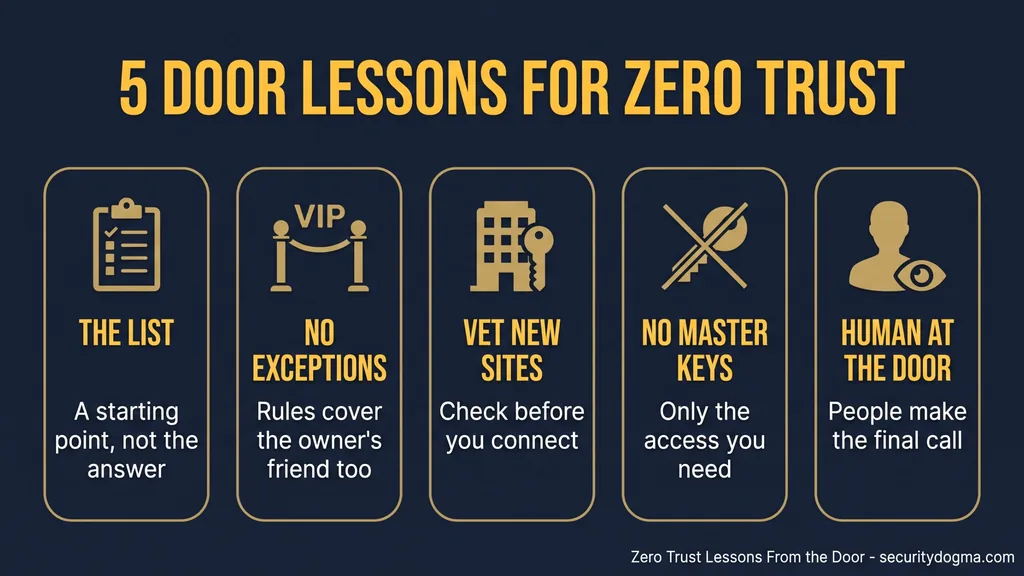
In IT, the approach to controlling access is called Zero Trust. NIST Special Publication 800-207, the U.S. government’s reference document on the subject, describes it as granting no implicit trust to assets or user accounts based solely on their physical or network location or on who owns the device. Every request gets checked. Anyone who has worked a door already understands this. Here are five lessons from the door that became my lessons in IT.
Lesson 1: The list at the door is only a starting point
From the field — Yair Arad
When I worked the door at a nightclub, a woman came to the entrance one night and I didn’t let her in. A few weeks earlier she had started a fight inside, and she had been eighty-sixed, meaning she was never allowed back. I didn’t remember her face so much as a tattoo she had. It was unusual, and it was enough.
Every club has a list of people who are not coming back. In IT we have the same thing: IP addresses known to be malicious, accounts flagged as compromised, and sign-ins from countries where the organization does no business. Tools like Conditional Access let you block or challenge those sign-ins before they reach anything.
Those lists are worth having. But the tattoo is the part people miss. A list only works if you can recognize the person when they show up again. On the door, people changed their hair, came with a different group, or used a friend’s ID. Online it’s even easier. An attacker can change IP addresses in seconds or route traffic through a VPN in a “safe” country.
So I treat a blocklist as a starting point, not the whole answer. What I look for is the equivalent of the tattoo: signals that are harder to change.
- Is the sign-in coming from a device we know and manage?
- Does it match how this person normally works?
- Is it asking for more than this role normally needs?
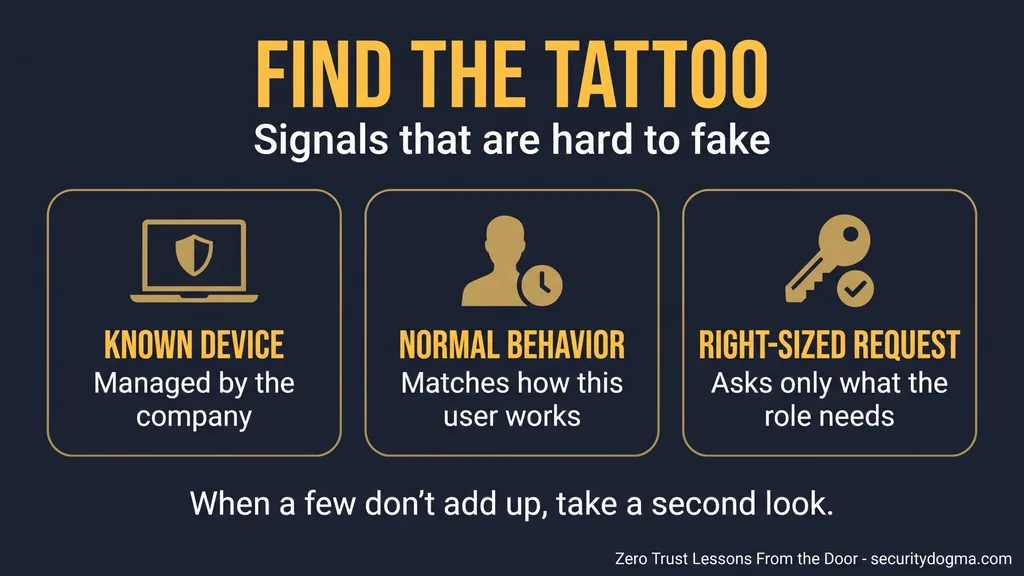
When a few of those don’t add up, the request gets a second look, the same way a familiar face with a different ID would on the door.
Career takeaway: knowing the rules isn’t enough. Noticing what doesn’t fit is the skill people pay for.
Lesson 2: The owner’s friend follows the rules too
From the field — Yair Arad
The hardest person to handle at that club wasn’t a stranger. It was a friend of the owner. He would get very drunk and start problems almost every time. Anyone else would have been eighty-sixed, but the owner didn’t want to ban him for good. What we did instead was keep him out for a few weeks at a time to make the point. Eventually it worked, and he changed how he behaved.
Every organization has its version of the owner’s friend. In IT it’s usually the senior executive who doesn’t want multi-factor authentication, the manager who wants a rule turned off because it slows his team down, or the long-time employee whose account has collected access for years because nobody wanted to say no. These exceptions are some of the most common weak spots I see, because they are made for the people with the most access.
Two things from the door apply directly. First, the rules have to cover everyone, including the people close to the owner. Second, the response doesn’t have to be all or nothing. On the door we used a temporary ban. In IT you can limit access for a period, require extra checks, or narrow what an account can do, and explain why. A proportional response is easier to defend, and in my experience it changes behavior more than a fight over a permanent rule.
Career takeaway: holding a standard with powerful people, without wrecking the relationship, is what managers are hired for.
Lesson 3: Check a new site before you connect it
In security work, when your company takes over a new site, you don’t just put your guards in the old posts and carry on. You check how the previous team worked, which keys are out there, who still has access, and whether their way of doing things matches your standards. Until it does, the site is a risk to your whole operation.
From the field — Yair Arad
Acquisitions in IT work the same way. I’ve been part of integrating a company whose security policies were much looser than ours. Before their systems, development environments and product could be connected to ours, they had to meet our standards, including the controls we maintain for frameworks like ISO/IEC 27001 and the Sarbanes-Oxley Act (SOX). If they couldn’t get there, the deal itself was at risk.
The technical side is usually about identity: consolidating old directory domains into one environment, removing accounts nobody can explain, and making sure the people who join keep working while you tighten things. The principle is the one from the new site. You don’t connect a building with unknown keys to your own until you know who holds them.
Career takeaway: asking “who holds the keys?” in a new site or a new job is how you learn any operation fast.
Lesson 4: Nobody gets a master key
In physical security, the most dangerous thing you can hand out is a master key. A cleaning contractor might need to get into every office, but you give them access to the floors they clean, during the hours they work, and you track who holds the key. You don’t give them the key to the safe because it’s easier.
From the field — Yair Arad
I chair the group that approves changes before they go into production, and the same question comes up there. One example: a proposal to build an internal tool and give it permission to read every employee’s email. The goal behind it may be reasonable. But a permission like that is a master key. It’s a serious privacy concern, and if the tool or the account running it is ever compromised, everything it can read is exposed. A request like that may not reach production at all, or only in a much narrower form.
This matters more now that companies want to connect AI tools to their data. Those tools often ask for broad access because it makes them more useful. The door question still applies: what does this actually need to reach, for whom, and for how long? Everything beyond that is risk you’re choosing to carry.
Career takeaway: asking “what does this actually need?” earns trust in any role that controls budgets, access or people.
Lesson 5: Keep a human at the door
If I had to name one thing IT gets wrong that a guard never would, it’s relying too much on technology. Cameras, ID scanners and alarms help, but a person still stands at the door making the final call, and that person notices things no system was set up to catch. A tattoo, for example.
In IT it’s easy to believe that once the policies are set and the tools are deployed, the job is done. Conditional Access, endpoint management and detection tools are powerful, and I rely on them every day. But they do what they were configured to do. They don’t know that an exception was made last year for a reason nobody remembers, or that a request makes sense on paper but not for this person. Alerts still need someone to look at them and decide.
The lesson from the door is to automate the routine checks and keep a person in the loop for the decisions that matter: exceptions, new access to sensitive data, changes to production, and anything that doesn’t add up.
Career takeaway: tools change, but judgment is what keeps you valuable as you move up.
Same decisions, different tools
| On the door | In IT | What it protects against |
|---|---|---|
| Banned list | Blocked IPs, compromised accounts, location rules | Known bad actors |
| Recognizing the tattoo | Managed devices, normal behavior patterns | Attackers who change their “face” |
| Temporary ban for the owner’s friend | Time-limited restrictions, extra checks | Exceptions for powerful users |
| Vetting a new site | Security review before connecting an acquisition | Inherited weaknesses |
| No master keys | Least-privilege access for people, apps and AI tools | One compromise exposing everything |
| A person making the call | Human review of exceptions and alerts | What automation misses |
How to use your security job to move up
- Take on the reports. Clear, honest writing gets noticed in every field.
- Help train new staff. It shows you can lead before you have the title.
- Learn scheduling and incident reviews. That’s how supervisors think.
- Keep a record of what you handle, such as incidents, decisions and problems solved, so you can describe it in interviews.
- Learn the basics of the field you want next before you apply.
For more on where security work can lead, see all security careers.
If IT is your next step, learn these five basics first
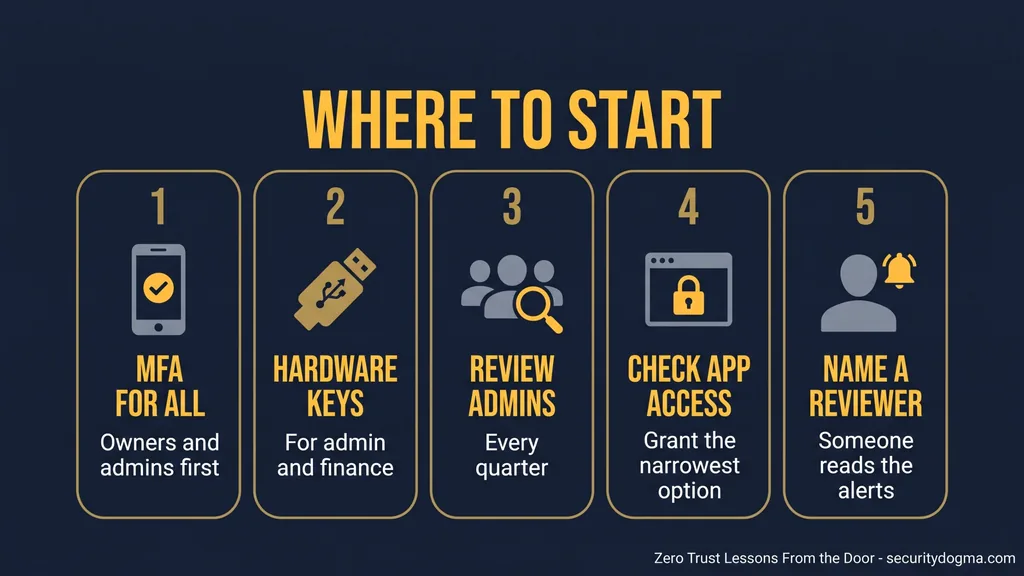
- Multi-factor authentication (MFA). How it works, and why it should cover everyone, starting with owners and admins.
- Phishing-resistant sign-in. Hardware security keys, and why codes sent by text can be intercepted or phished.
- Admin access reviews. Checking who has admin rights and removing what nobody can explain.
- App permissions. Reading what a new app or AI tool asks to access, and granting the narrowest option.
- Alert review. Why someone has to read the alerts and decide, not just collect them.
Tools that help
Picked on publisher information and manufacturer specifications, not hands-on testing.
So Good They Can’t Ignore You
Cal Newport · Hardcover · career strategy
Argues that building rare, valuable skills, not following your passion, is what leads to better work. It’s the same point this article makes about security skills, and it applies even if you leave security.
Watch out for: It’s general career advice, not security-specific.
See current price →Confident Cyber Security, 2nd Edition
Jessica Barker · Kogan Page · Paperback
A plain-language introduction to cyber security and how to protect against threats. Delinea’s cybersecurity reading list recommends it for beginners and career changers.
Watch out for: It’s an overview, not exam prep for a certification.
See current price →Yubico YubiKey 5 NFC
USB-A + NFC · FIDO certified · no battery
A hardware security key for phishing-resistant sign-in. Setting one up on your own email and accounts is a practical way to learn basic #2 above. A USB-C version (5C NFC) is on the same listing.
Watch out for: Register a second key as a backup. Losing your only key can lock you out, and not every service supports security keys.
See current price →Three key takeaways
- Security work is training for any career if you treat it that way.
- The judgment you build on a door, such as noticing what doesn’t fit, holding a standard and limiting access, is what higher-paying roles reward.
- Take on responsibility at your post now, and learn the basics of the field you want next.
Frequently asked questions
Can security guards move into higher-paying jobs?
Yes. Reading people, making calm decisions, writing reports and managing risk carry into supervision, management and other fields.
Do security skills transfer to IT?
Many do. Controlling access, checking who belongs, and limiting who holds which keys are the same ideas behind IT access control.
What is Zero Trust in simple terms?
A security approach where no person or device is trusted automatically. Every request to reach a system is checked, wherever it comes from.
What does “eighty-sixed” mean?
Banned from a venue. Door staff keep a list of people who have been 86’d and don’t let them back in. See How to Become a Bouncer for how venues manage an 86 list.
Sources
Reviewed November 5, 2026. References to ISO/IEC 27001, the Sarbanes-Oxley Act and NIST guidance are for context only.
Legal disclaimer: This page is for general information and education only. It is not legal advice, and reading it does not create an attorney-client relationship. Security Dogma is not a law firm. Laws, licensing rules and court decisions vary by state and change often, and what is written here may not match your situation or be current when you read it. Before you act on anything here, check the official rules from your state licensing agency, follow your employer’s and client site’s policies, and talk to a licensed attorney in your state for legal questions. See our Terms and Conditions and how facts are checked in our Editorial Policy.