

Security Dogma is reader-supported. When you buy through links on this page, we may earn a commission at no extra cost to you. As an Amazon Associate I earn from qualifying purchases. Learn more
Quick answer
The first security job in a new home is to cut off everyone who had access before you: previous owners or tenants, anyone they gave a key or code to, contractors and, in a new build, the builder. In the first week:
- Rekey or replace every exterior lock, including the garage entry door and any shed, gate or storage locks.
- Erase the garage door opener’s remotes and keypad codes, and change any gate or community codes you can.
- Take over or reset smart devices the last owner left: video doorbells, cameras, smart locks, the alarm panel and the Wi-Fi router.
- Walk the inside and the perimeter looking for weak doors, frames, windows, sliding doors and dark spots.
- Test the smoke and carbon monoxide alarms and file a USPS change of address.
Renting? Do the same checks, but ask your landlord before you change locks or drill anything. There’s a printable version of the whole checklist below.
How this guide was made: the steps for Ring, Google Nest, Chamberlain/LiftMaster and Kwikset come from the manufacturers’ own support pages, and the costs come from the cost guides named next to them. Links are in the Sources section. The “From the field” section is my own experience from more than 15 years in security work. Device menus change, so check the manufacturer’s current instructions for your model.
Prefer to watch? This video covers the same ground in about six minutes.
This video is hosted by YouTube (Google). Loading it shares your IP address with Google and may set cookies. See our Privacy Policy.
This video was made with AI tools and summarizes this guide. Scenes are illustrations, not real events.
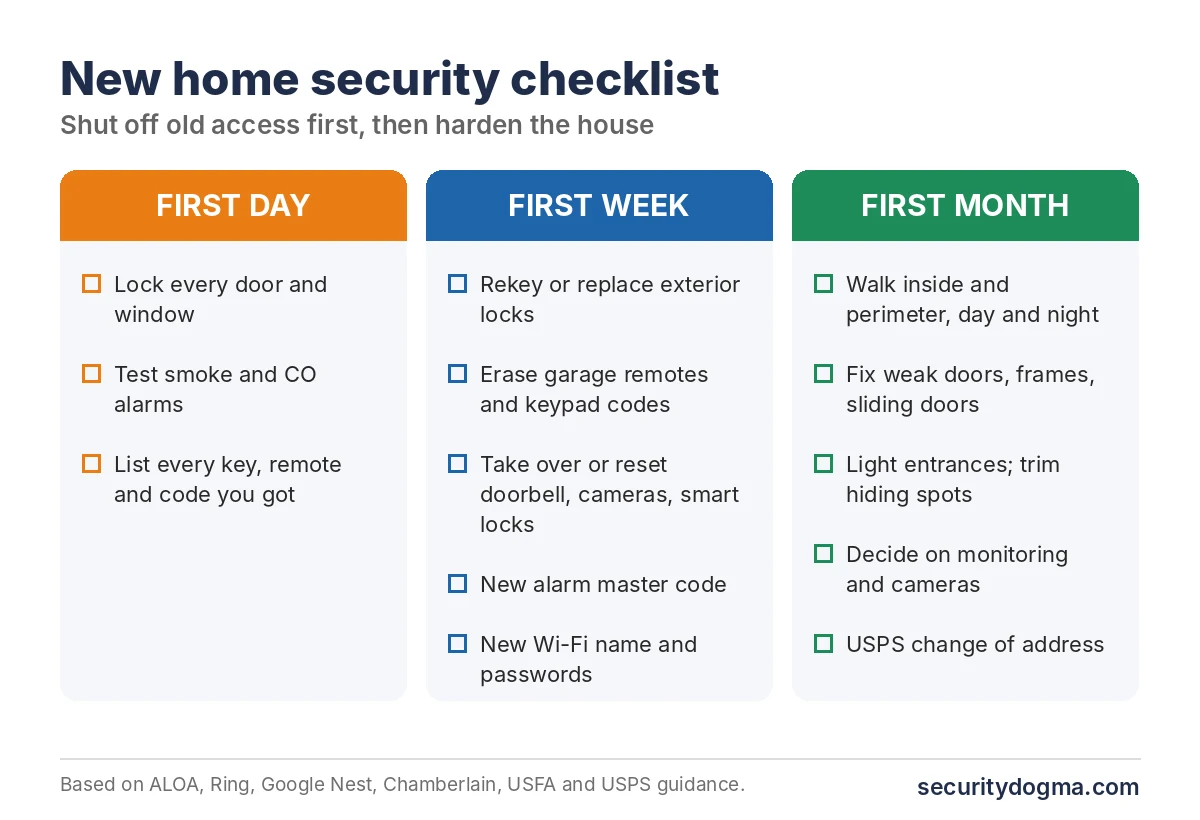
New home security checklist: first day, first week, first month
Do the access items first. A thief doesn’t need to break a window if a copy of your key is in someone else’s drawer.
| When | Do this | Details |
|---|---|---|
| First day | Lock every door and window with what you have. Test the smoke and CO alarms. Write down every key, remote, fob and code you were handed. | Alarms · Access audit |
| First week | Rekey or replace all exterior locks. Erase garage remotes and keypad codes. Take over or reset the doorbell, cameras, smart locks and alarm. Change the Wi-Fi network name and password. | Locks · Garage · Smart devices |
| First month | Walk the inside and outside. Reinforce weak doors, frames and sliding doors. Add lighting and trim shrubs that hide doors and windows. Decide on monitoring and cameras. File your USPS change of address if you haven’t. | Walk-through · Monitoring · Mail |
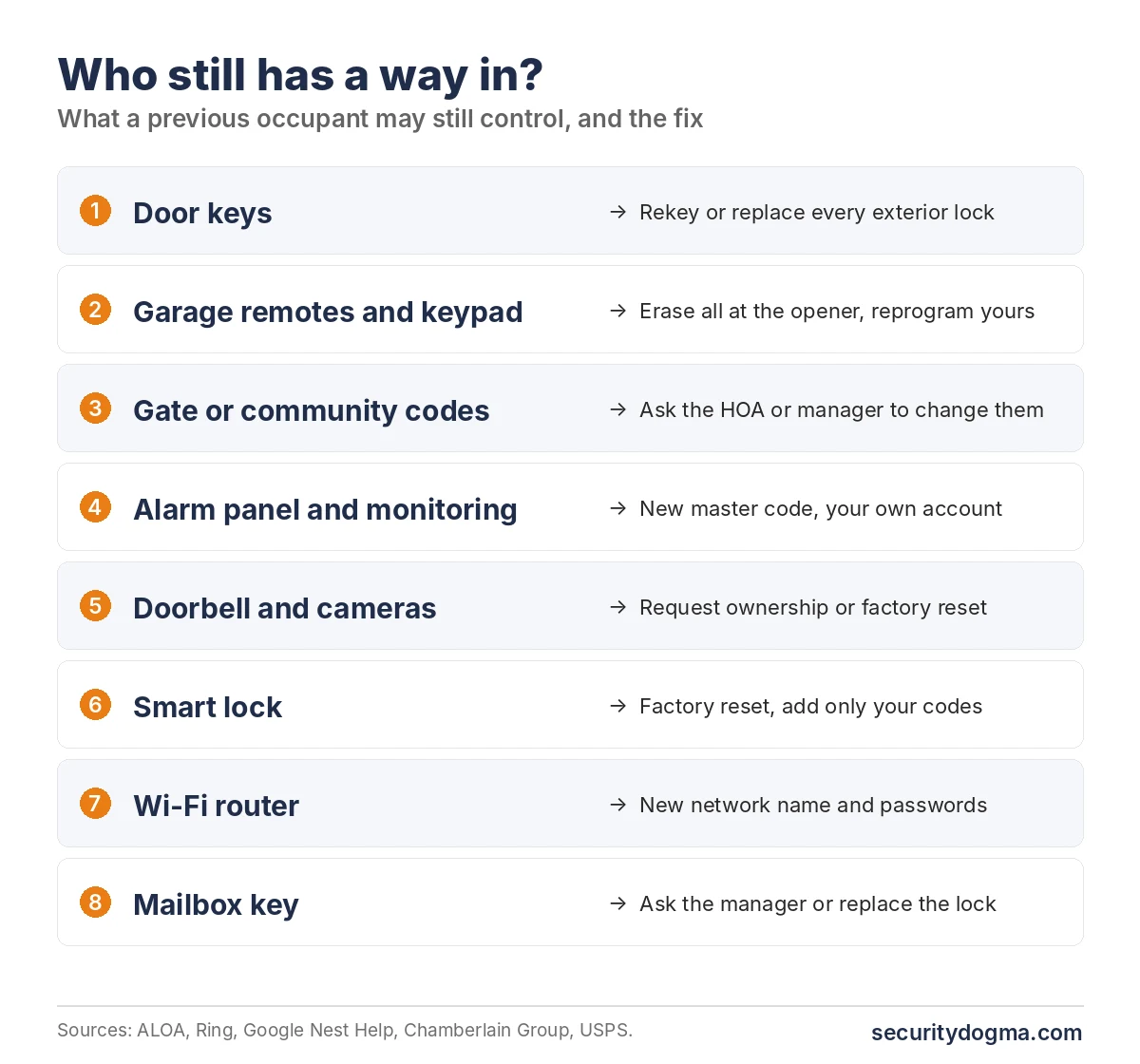
Step 1: Find out who still has a way in
You rarely know how many copies of a key exist, or who the last owner gave a garage code to. The locksmith trade association ALOA says it is “rare that all keys are turned over to the new owner,” and that many newer locks use “construction keying”, which lets the builder’s keys open the home until the locks are rekeyed. So treat every key, code and app account you inherited as already shared.
| What they might still have | How to take it back |
|---|---|
| Door keys, including garage entry, back door, shed and gate locks | Rekey or replace every exterior lock |
| Garage door remotes, the outside keypad code and car buttons (HomeLink) | Erase all remotes and codes at the opener, then reprogram yours |
| Gate, community or building codes and fobs | Ask the HOA, community or building manager how codes and fobs are issued and whether the old ones can be cancelled |
| The alarm panel master code and monitoring account | Set a new master code and open your own account, or self-monitor |
| Video doorbell and cameras still on their app account | Request ownership or factory reset |
| Smart lock codes and app access | Factory reset the lock and add only your own codes |
| The Wi-Fi router and its admin login | Reset it and set a new network name, password and admin password |
| Mailbox key | Ask the manager or replace the lock |
Should you change the locks when you move into a new house?
Yes. ALOA says rekeying should happen as soon as possible after you take possession, and suggests rekeying garage and storage-building locks at the same time. You have two ways to do it:
| Rekey | Replace | |
|---|---|---|
| What happens | The pins inside the lock cylinder are changed so the old keys stop working. You keep the same hardware. | The whole lock comes off and a new one goes on. |
| Best when | The locks are in good shape and you’re happy with them. | The locks are worn, cheap or damaged, or you want an upgrade such as a better deadbolt or a smart lock. |
| DIY? | Yes, if your locks support it (for example Kwikset SmartKey) and you have a working key. Otherwise it’s a locksmith job. | Usually yes for standard deadbolts and knobs. |
| Bonus | A locksmith can set all your doors to one key. | You choose the security level. |
What does it cost to rekey a house?
There’s no single price. Published cost guides don’t agree with each other, and some contradict themselves, so treat these as rough ranges and get two or three quotes:
| Source | What it says |
|---|---|
| HomeAdvisor (updated Aug 9, 2022, based on member-reported costs) | $30 to $60 per lock; a trip fee of $50 to $100 may apply |
| HomeGuide (undated; per-lock figures from a Locksmith Ledger national survey) | About $19 to $37 per lock depending on the lock type, before a call-out fee |
| Angi (2025 data, survey of customers) | $80 to $150 for rekeying, but it doesn’t say whether that’s per lock or per job; a different section says $50 to $100 |
Expect to pay more for nights, weekends and emergency calls. If you’re replacing locks anyway, compare the price of new hardware with a rekey quote. If you’re weighing up a smart lock, see smart lock vs deadbolt.
Can you rekey your own locks?
Sometimes. Kwikset SmartKey locks are designed for it: you insert the current working key, turn it a quarter turn, push the SmartKey tool into the small hole beside the keyway, then insert your new key and turn it to set the lock. Kwikset requires the current key, so if you weren’t given a working key, you’ll need a locksmith. Most other locks need a locksmith or a rekeying kit and some practice.
How to reset the garage door opener after moving in
The previous owner, their family, their cleaner and their neighbors may all have a remote or the keypad code. Erase everything and start over with only the remotes you hold.
- Chamberlain, LiftMaster and Craftsman Wi-Fi (myQ) openers: Chamberlain’s support page says a factory reset erases all programmed remotes, keypads, myQ devices and HomeLink car buttons, plus the Wi-Fi settings and the link to the old myQ account. On openers with a yellow or white LEARN button, you hold it until the light comes on and goes off, then repeat twice more; the opener beeps three times when it’s done. Other button colors need one press-and-hold. Then reprogram your own remotes and keypad.
- Other brands and older openers: look up your model’s manual (the model number is usually on a label on the motor unit) and follow its steps for erasing remotes and keypad codes.
- Your car: if your car has built-in garage buttons, program them again after the reset.
A garage is a common way in. Our garage door security guide covers the rest: the emergency release, the door into the house and older fixed-code openers.
What to do with a Ring, Nest or smart lock the previous owner left
Smart devices are often still linked to the previous owner’s account, which means they may still be able to see your front door. Don’t just keep using them as they are.
Ring doorbells and cameras
In the Ring app, tap Set Up a Device, follow the prompts and choose Request Ownership. According to Ring’s help page, the device can stay on the previous owner’s account for up to 15 days while they get emails asking them to respond. Doorbells, cameras and chimes are then released automatically, but Ring Alarm systems and Ring smart lights are not. Cancelling their subscription or unplugging the device doesn’t release it, and Ring support can’t speed things up. If you can reach the seller, ask them to transfer it in the app.
Google Nest cameras and doorbells
Google’s help page says that if you can’t get into the previous account, factory reset the camera or doorbell and set it up on your own account. For older devices that use the Nest app, Google says to unplug the device and wait for the previous owner’s video history to expire, which can take up to 60 days, before connecting it again.
Smart locks, the alarm and the Wi-Fi router
- Smart locks: do a factory reset using the maker’s instructions, set them up on your account and add only your own codes. Then rekey the lock’s key cylinder too, because the old physical keys still work.
- Alarm panel: if nobody gave you the master code, the panel may need a reset by the alarm company or an installer. Our guide to home security without a monthly fee explains what to do with an inherited panel.
- Wi-Fi router: if a router came with the house, reset it and set a new network name, Wi-Fi password and admin password. Cameras on a shared network are only as private as that network.
Walk the inside and the perimeter
Once old access is gone, look at the house the way a burglar would. Do it once in daylight and once after dark.
- Doors and frames: are exterior doors solid, with a deadbolt? Is the strike plate held by long screws into the frame? See door and window security.
- Sliding doors: can it be lifted off the track or forced? A bar in the track is a cheap fix. See how to secure a sliding glass door.
- Windows: do the latches work, especially on the ground floor and near a roof or fence?
- Lighting: are entrances, the garage and the side of the house lit at night?
- Hiding spots: shrubs, fences or sheds that hide a door or window from the street.
- Spare keys: check under mats, rocks and planters for a key the last owner left.
For the full layer-by-layer approach, read how to secure your home and where burglars look first.
Do you need an alarm or cameras, and does it have to cost monthly?
If the house came with an alarm and a monitoring company’s sign, the old monitoring contract belonged to the previous owner. You can open your own account with that company, switch to another, self-monitor or go without. A monthly fee isn’t required: our guide to home security systems with no monthly fee compares the options, and home security cameras covers what to look for.
Smoke and carbon monoxide alarms
They aren’t burglary protection, but they belong on the first-day list. The U.S. Fire Administration says to put smoke alarms inside and outside every bedroom and on every level, test them monthly and replace each alarm 10 years after its manufacture date (the date is printed on the alarm). For carbon monoxide alarms, follow the manufacturer’s placement instructions and your local code; Minnesota’s State Fire Marshal, for example, advises placing them within 10 feet of each sleeping room.
Mail, mailbox keys and your identity
- Change of address: file one with USPS so your mail doesn’t keep arriving at your old address. USPS says online filing costs $1.25 for identity verification, standard forwarding lasts 12 months, and you should allow 7 to 10 business days for it to start.
- Shared or cluster mailboxes: USPS says to ask the building or community owner, manager or superintendent for keys and lock repairs. If you don’t know who else has a key, ask them to change the lock.
- Mail for the last owner: don’t open it. Write “Not at this address” on it and put it back in the mail.
If you rent: what you can and can’t change
The same risks apply to renters: the last tenant may still have a key. Whether you can change the locks yourself depends on your lease and your state’s law, so ask the landlord first, in writing. Some landlords rekey between tenants, and some will let you do it if you give them a copy of the new key. If the landlord says no, use protection that doesn’t change the property: a door security bar, a portable door lock, a video doorbell that doesn’t need drilling, or indoor DIY cameras, as long as they follow the lease. Our apartment security guide for renters covers what to ask your landlord and the no-drill options.
From the field: what I do when I move
Every time I’ve moved into a new place, I’ve done the same two things first. I check the inside and the perimeter for weaknesses and anything that needs fixing, and I change the locks. I didn’t do the locks myself: I had a certified locksmith do it.
In my security work I’ve seen old keys, codes and remotes cause problems more than once. My recommendation was always the same: change them or upgrade them, and don’t assume the old ones are gone.
If you rent, do the same, but check with your landlord first. In my opinion it shouldn’t be an issue. If the landlord objects, find alternatives: equipment that protects you, DIY cameras and so on, while still following the landlord’s rules.
Printable new home security checklist
Print this section and tick it off as you go.
First day
- ☐ Lock every door and window
- ☐ Test every smoke and CO alarm
- ☐ List every key, remote, fob and code you received
First week
- ☐ Rekey or replace all exterior locks (front, back, garage entry, shed, gate)
- ☐ Erase garage remotes and keypad codes; reprogram your own
- ☐ Change gate or community codes, or ask the manager how
- ☐ Take over or reset the doorbell, cameras and smart locks
- ☐ Set a new alarm master code; decide on monitoring
- ☐ Reset the Wi-Fi router: new name, password and admin password
- ☐ Check for hidden spare keys outside
First month
- ☐ Walk the inside and perimeter, by day and after dark
- ☐ Fix weak doors, strike plates, sliding doors and window latches
- ☐ Add lighting at entrances and dark sides
- ☐ Trim shrubs that hide doors and windows
- ☐ File a USPS change of address; sort out the mailbox key
- ☐ Make a family security plan
Gear that helps in the first week
These are research picks, not products I’ve tested: chosen from manufacturer listings and long-term buyer ratings. Check that each fits your doors, opener and lease before you buy. Prices change, so check the listing. Some links are affiliate links: if you buy through them, Security Dogma may earn a commission at no extra cost to you. As an Amazon Associate I earn from qualifying purchases.
Kwikset SmartKey Re-Key Kit
SmartKey re-key tool · 4 identical everyday keys plus 2 alternate keys · for Kwikset SmartKey locks only · original working key required (per the listing)
If your doors already have Kwikset SmartKey locks, this lets you make the old keys useless in minutes, without a locksmith visit.
Watch out for: it won’t work on other brands or on non-SmartKey Kwikset locks, and you need a key that currently works the lock.
See current price →Paid link · opens Amazon.com
Kwikset 980 Deadbolt with SmartKey
Single-cylinder deadbolt, keyed one side · SmartKey rekeying · adjustable latch for standard door preparations · lifetime mechanical and finish warranty (per the listing)
A straightforward replacement deadbolt you can rekey yourself the next time keys go missing.
Watch out for: check your door’s thickness and backset before you buy, and use long screws in the strike plate.
See current price →Paid link · opens Amazon.com
Chamberlain myQ Garage Door Keypad
Wireless, battery-powered · personal PIN plus temporary guest PINs · fits Chamberlain, LiftMaster and most Craftsman openers made after 1997 with safety sensors (per the listing)
A fresh keypad means a code only you know, and temporary codes you can hand out and cancel.
Watch out for: it only works with compatible openers; check your opener brand and year first.
See current price →Paid link · opens Amazon.com
First Alert Battery Combination Smoke & CO Alarm
2-in-1 smoke and carbon monoxide alarm · battery-operated, no wiring · end-of-life warning · test/silence button (per the listing)
If the house is missing alarms, or they’re past their date, a battery combo unit is a quick fix you can install the day you move in.
Watch out for: this listing doesn’t describe it as linking to other alarms. If the house has hardwired, interconnected alarms, replace like with like.
See current price →Paid link · opens Amazon.com
SecurityMan 2-in-1 Door & Sliding Door Security Bar (2-pack)
Iron bar, adjustable 18.25″ to 47.5″ · caps for hinged doors and for sliding doors or windows · rated to withstand 400 lb of pressure (per the listing)
No drilling, no lease problems: it braces a door shut from the inside, or blocks a sliding door’s track.
Watch out for: it only works while you’re inside, and it’s an extra layer, not a replacement for a good lock.
See current price →Paid link · opens Amazon.com
Frequently asked questions
What is the first thing to do for security when you move into a new house?
Shut off old access: rekey or replace the exterior locks, erase the garage door remotes and keypad codes, and take over or reset any doorbell, cameras, smart locks and alarm the previous owner left. Then walk the house for weak doors, windows and lighting.
Should I change the locks when I buy a house?
Yes. You can’t know how many copies of the keys exist. The locksmith trade association ALOA says it is rare for all keys to be handed over and recommends rekeying as soon as possible, and suggests doing the garage and storage-building locks too.
Is it cheaper to rekey or replace locks?
Rekeying is usually cheaper because you keep the hardware and only the pins change. Published cost guides don’t agree on exact prices, so get quotes. Replace instead if the locks are worn or you want better ones.
Should I rekey a new build house?
Yes. ALOA notes that many newer locks use construction keying, which lets the builder’s keys open the home until the locks are rekeyed.
How do I reset a garage door opener after buying a house?
Erase all remotes and keypad codes at the opener, then reprogram only your own. On Chamberlain, LiftMaster and Craftsman Wi-Fi openers, a factory reset with the LEARN button erases remotes, keypads, myQ devices and car HomeLink buttons. For other brands, follow your model’s manual.
Can I use a Ring doorbell the previous owner left?
Yes, once it’s on your account. Request ownership in the Ring app. Ring says the device can stay on the previous owner’s account for up to 15 days; doorbells, cameras and chimes are then released automatically, but Ring Alarm systems are not.
What do I do with an alarm system that came with the house?
Set a new master code, or have the alarm company or an installer reset the panel if you don’t have it. The previous owner’s monitoring contract was theirs, so open your own account, switch companies or self-monitor.
Can a renter change the locks?
It depends on your lease and your state’s law. Ask your landlord first, in writing. If they say no, use no-drill protection such as a door security bar or a portable lock.
Sources
- ALOA Security Professionals Association, Change your locks when you move
- Ring, Transfer ownership of a Ring device
- Google Nest Help, Camera is connected to another account
- Chamberlain Group, How to factory reset a myQ device
- Kwikset, How to re-key SmartKey Security locks
- HomeAdvisor, locksmith cost (updated Aug 9, 2022)
- HomeGuide, locksmith cost
- Angi, how much does a locksmith cost (2025 data)
- U.S. Fire Administration, Smoke alarms
- Minnesota State Fire Marshal, Smoke and carbon monoxide alarm tips
- USPS, Standard Forward Mail and change of address
- USPS Notice 11, Tips for postal customers with centralized mailboxes
Checked November 24, 2026. Device steps, prices and rules change; check the manufacturer and your lease or local rules. This guide is general information, not legal advice.
Legal disclaimer: This page is for general information and education only. It is not legal advice, and reading it does not create an attorney-client relationship. Security Dogma is not a law firm. Laws, licensing rules and court decisions vary by state and change often, and what is written here may not match your situation or be current when you read it. Before you act on anything here, check the official rules from your state licensing agency, follow your employer’s and client site’s policies, and talk to a licensed attorney in your state for legal questions. See our Terms and Conditions and how facts are checked in our Editorial Policy.