

Security Dogma is reader-supported. When you buy through links on this page, we may earn a commission at no extra cost to you. As an Amazon Associate I earn from qualifying purchases. Learn more
A dash cam plugged into a lighter socket switches off with the car. A hardwired one takes power from the fuse box, so it can keep watching while you are away from the vehicle. For anyone who parks on a stakeout, a post or a client site, that is the difference between a camera that records your drive and one that records what happens to your car. This guide shows how to hardwire a dash cam to your fuse box, step by step, and where people go wrong.
Still choosing a camera? See our guide to the best dash cams for private investigators and security pros.
How we wrote this. This is a research-based guide for U.S. readers, built from manufacturer instructions from VIOFO, BlackVue and Littelfuse. We did not install these kits in your vehicle. Fuse boxes differ by make, model and year, so your owner’s manual overrules anything here. All images on this page, including the top image, are illustrations, not photos of a real installation.
Quick answer
- What you need: a hardwire kit that matches your camera’s connector, two fuse taps that match your fuse type, a multimeter or test light, a fuse puller and a trim tool.
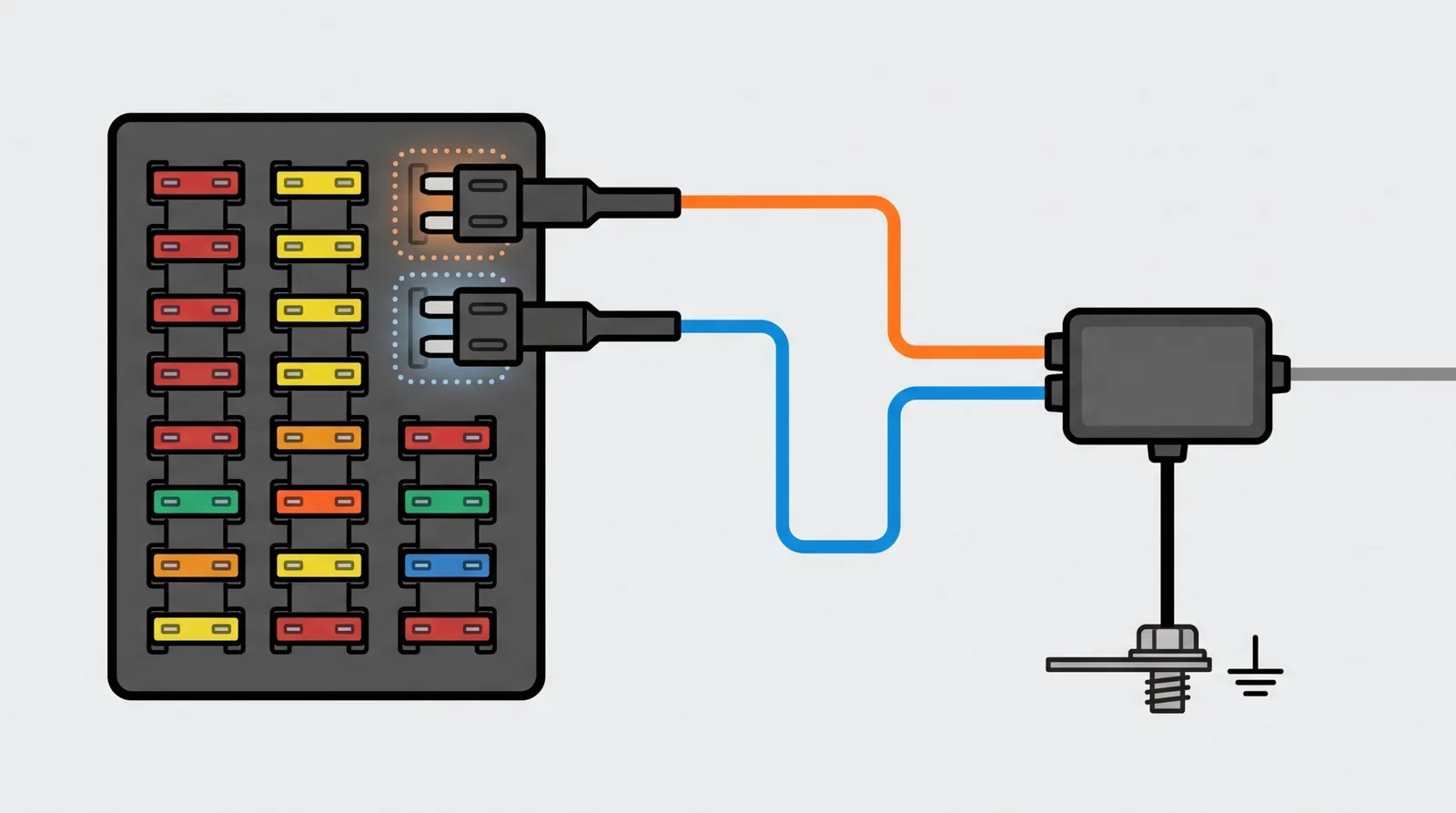
- Three connections: one constant (always-on) fuse, one ACC (ignition-only) fuse and one ground to bare metal.
- Two separate fuse slots. Never put both power wires on one fuse tap.
- Set the low-voltage cutoff so the camera stops before it drains your starter battery.
- If you cannot identify a safe circuit, stop and use an installer or an OBD-II power cable instead.
Is hardwiring right for you?
Hardwiring gives you parking mode, a clean install with no cable across the dash, and a camera that starts and stops with the car. The trade-off is that you are connecting to your vehicle’s fuse box. If that is not for you, an OBD-II power cable draws power from the diagnostic port instead, with no fuse box work. A battery pack is another route.
If the vehicle is leased, belongs to your employer or belongs to a client, get permission before you modify it. Need to record on foot as well? See our guide to body cameras for security guards.
FROM THE FIELD
When I was working in the field, I went low-tech. For a long stretch my “dash cam” was a GoPro, and at other times it was just my phone. (I honestly can’t tell you which GoPro it was. That’s how little thought I gave the gear.)
It felt resourceful at the time. Looking back, it was a workaround. A camera built for the job, installed properly, would have been the better call in every way that counts: safer, more professional, and a better result when it came time to rely on the footage.
I wish I had known then what to buy and how to put it in. That’s the reason this guide exists. Do it once, do it properly, and let the camera do its job while you do yours.
What you need
- A hardwire kit that matches your camera. Kits are camera specific. VIOFO’s HK4 lists compatibility with the A119 Mini 2, A229 Plus, A229 Pro, A229 Ultra, A329, T130 and WM1, and says it does not work with the A129 Duo family. Check the connector too, USB-C or mini-USB.
- Fuse taps (add-a-circuit) that match your fuse type. BlackVue lists Micro2, Micro3, Mini, ATO and LPM styles. Pull a fuse and compare its shape. Littelfuse says its tap turns one fuse slot into two without cutting or splicing.
- A multimeter or test light, to find the right fuses.
- A fuse puller and needle-nose pliers.
- A trim removal tool, to tuck the cable behind panels without scratching them.
- Zip ties or tape, and your owner’s manual.
Driving a truck or van? Some heavy vehicles run a 24V electrical system. VIOFO says its HK4 accepts 12V to 24V input, but kits differ, so check the input range on your kit before you buy, and read your vehicle’s manual to confirm its system voltage.
Hardwire kits and power options on Amazon
Kits are camera specific, so confirm the connector and compatibility on each listing. Prices are as we saw them on October 22, 2026 and change often.
VIOFO HK4 Hardwire Kit
USB-C · 12V to 24V input · four cutoff levels · 24-hour parking mode
VIOFO’s own kit, listed as compatible with the A119 Mini 2, A229 Plus, A229 Pro, A229 Ultra, A329, T130 and WM1. VIOFO sells it separately on its own site (we saw $17.99 without fuses to $25.99 with an 8-piece fuse set on October 22, 2026). On Amazon.com we found it only inside camera bundles.
Watch out for: It does not work with the A119V3 or the A129 Duo family. The Amazon button below goes to a bundle that includes a camera.
See the A229 Pro bundle on Amazon →ROVE Ultimate Hardwire Kit
USB-C · 24-hour parking monitoring · $29.99 seen October 22, 2026
ROVE’s own kit, listed as fitting the R2-4K and R2-4K PRO. It showed 2K+ bought in the past month.
Watch out for: It is listed for ROVE models only. Check the fit before buying it for another camera.
See current price →REDTIGER F7N Hardwire Kit
USB-C · 12V to 24V input · fuse kit included · $25.99 seen October 22, 2026
A kit sold for REDTIGER’s F7N dash cam, with a fuse kit and low-voltage protection. It showed 2K+ bought in the past month.
Watch out for: The listing is for the F7N. Confirm compatibility before using it with another model.
See current price →Unbranded USB-C hardwire kit
USB-C · ACC detection · voltage display · $16.99 seen October 22, 2026
A low-priced kit with four adjustable cutoff levels and a voltage display. It showed 2K+ bought in the past month.
Watch out for: It is unbranded and we found no independent testing. Check that your camera uses USB-C and accepts 5V input before buying.
See current price →Garmin Constant Power Cable
OBD-II port · made for Garmin dash cams · $49.75 seen October 22, 2026
Powers a compatible Garmin dash cam from the OBD-II port, even when parked, according to the listing. No fuse box work.
Watch out for: It is made for Garmin cameras. Check the listing for your model and how it behaves with your vehicle.
See current price →Buying a VIOFO A229 Pro? The 2-channel bundle and the 3-channel bundle both include the HK4 hardwire kit, according to their listings. Already own a compatible VIOFO camera? Buy the kit from VIOFO’s site. Amazon also lists a third-party “HK4” kit from a brand called Bedaily ($15.99 seen October 22, 2026). It is not made by VIOFO, and we found no independent testing, so check compatibility and the cutoff settings before you rely on it.
How to hardwire a dash cam, step by step
- Match the kit to your camera. Check the connector and the compatibility list before you open the fuse box.
- Park, switch everything off and read the manual. Turn the ignition off and take out the key. The fuse box is usually under the driver’s side dashboard, near the steering column or in the glove compartment. Your manual shows where it is and gives a fuse diagram.
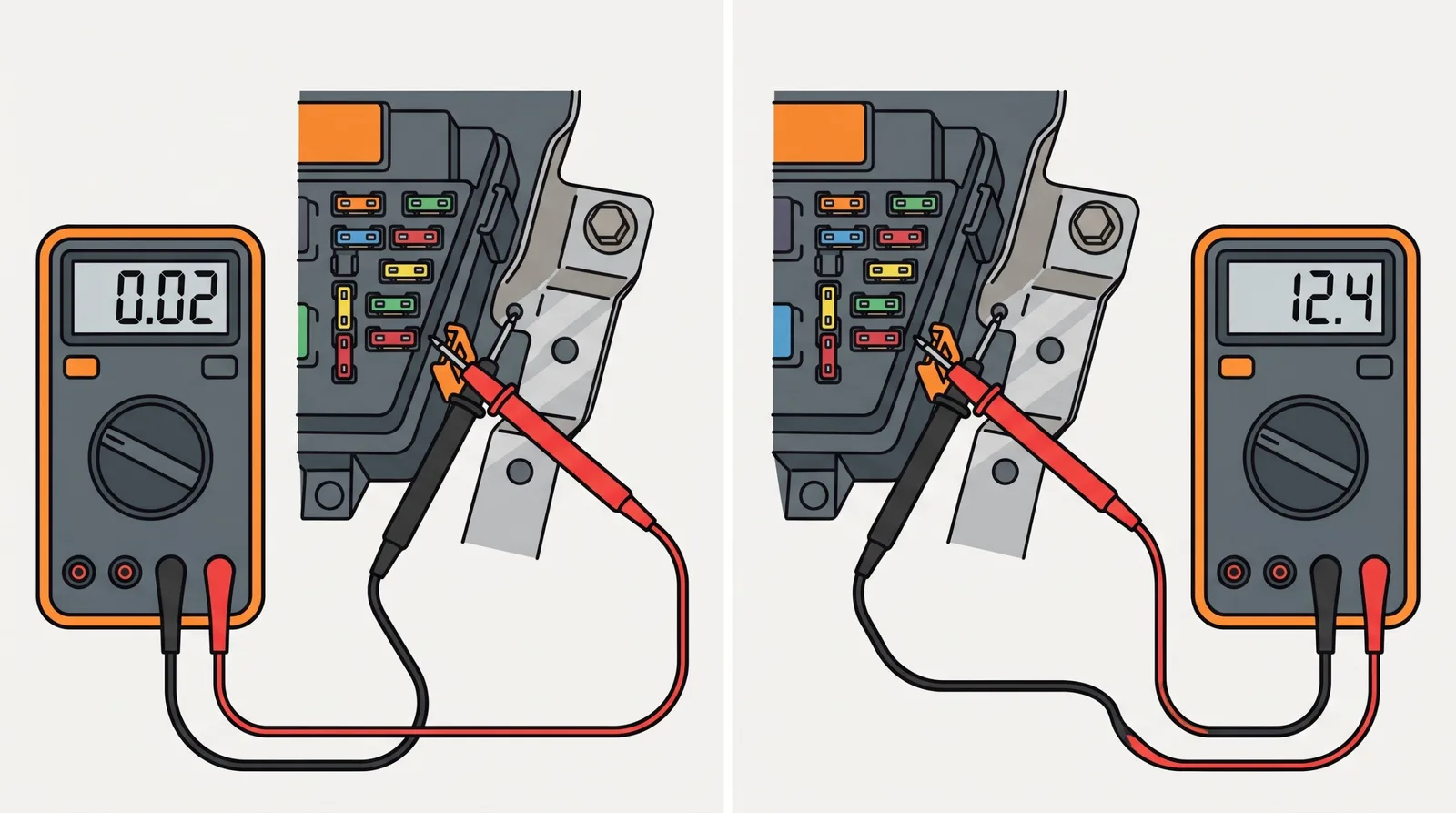
- Find a constant (always-on) fuse. With the car off, put the black probe on bare metal and the red probe on the test point on top of a fuse. VIOFO says a reading of 12V or 24V means a battery (constant) circuit. BlackVue lists dome light, clock, memory and hazard circuits as common examples.
- Find an ACC (ignition-switched) fuse. It reads 0V with the ignition off and about 12V with the ignition on. BlackVue lists ACC, ignition, radio, audio and power-outlet circuits as common labels.
- Pick circuits that are safe to share. Avoid anything tied to airbags, stability control, brakes or engine management. Kit makers list circuits such as ACC, ignition, radio and power-outlet fuses as common examples for the ACC connection, but which are safe differs by vehicle, so confirm each choice in your owner’s manual.
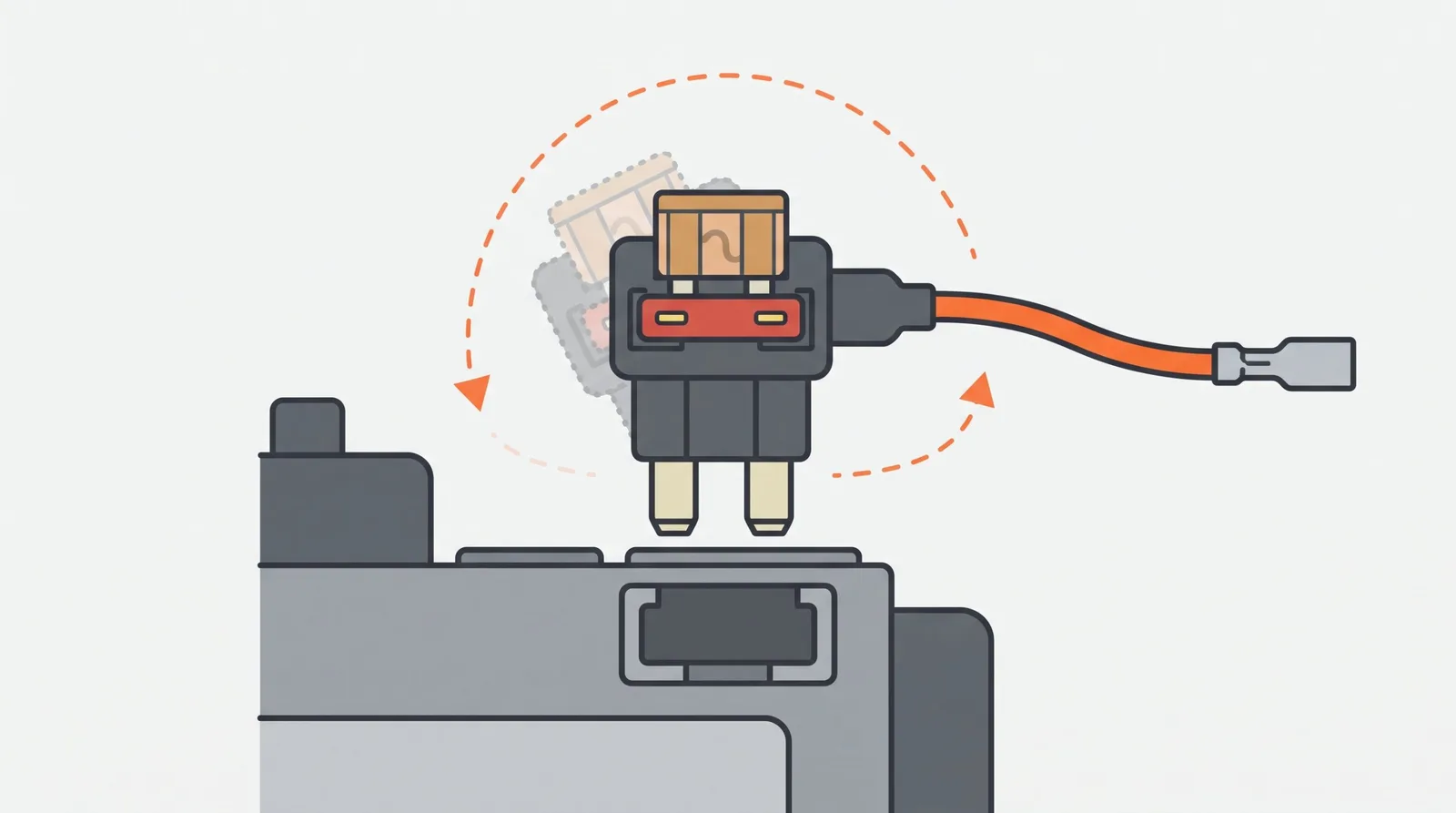
- Fit the fuse taps. Pull the chosen fuse and match its shape to the tap. Put the original fuse back into the tap so the factory circuit keeps working, and put the tap’s own fuse in the second slot. BlackVue says its taps come with a 3A or 5A fuse, so use the fuse supplied with your kit. Press each tap in fully. If the camera shows no power, turn the tap 180 degrees and test again with the multimeter.
- Use two separate taps. The constant wire goes to the constant fuse and the ACC wire goes to the ACC fuse. BlackVue warns against connecting both wires to a single tap. Wire colors vary: BlackVue uses yellow for constant and red for ACC, and other brands differ, so follow your kit’s labels.
- Connect the ground. Attach the ring terminal to a clean, unpainted, rust-free metal chassis bolt near the fuse box and tighten it. A poor ground can make the camera lose power.
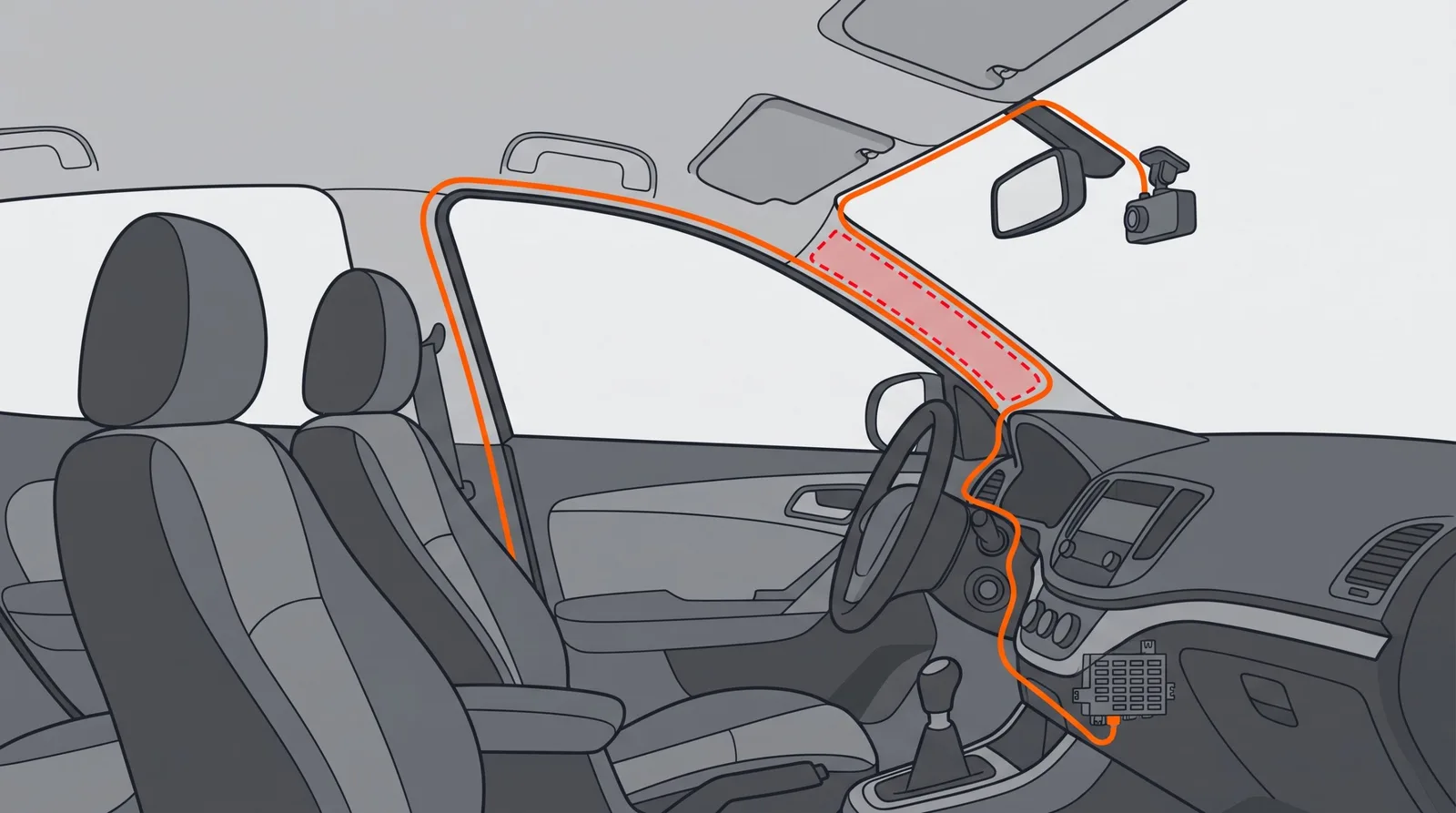
- Route the cable. Run it from the fuse box behind the trim and along the headliner or A-pillar to the camera, using the trim tool to tuck it in. Keep it clear of airbags, pedals and the gear lever, and keep the driver’s view clear. BlackVue warns against routing across areas that could interfere with airbag deployment.
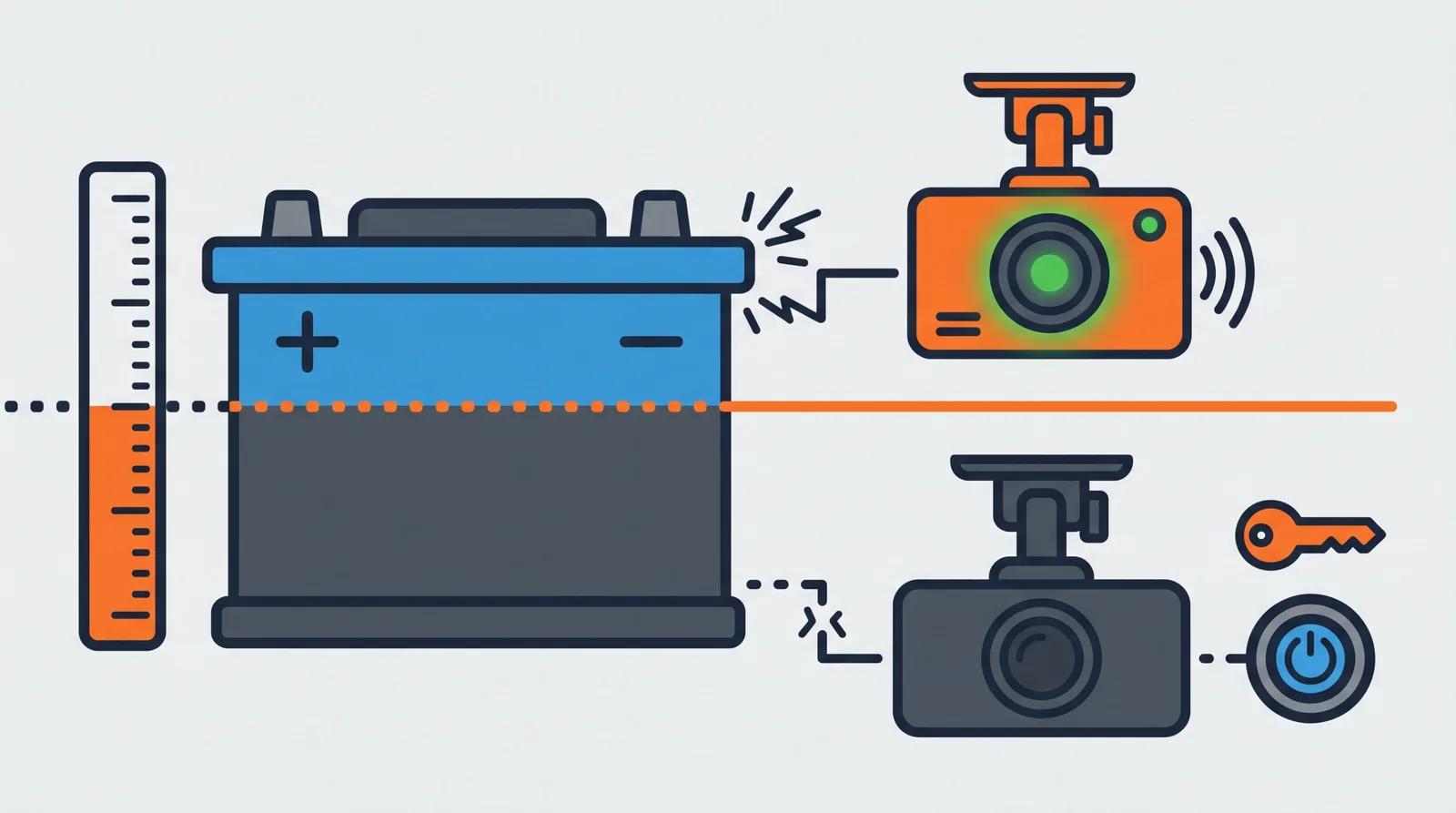
- Set the low-voltage cutoff. Kits let you choose a voltage at which they stop powering the camera so the car can still start. VIOFO says the HK4 has four options but does not list the voltages. One popular third-party listing shows 11.6V to 12.5V. A higher cutoff protects the battery more but ends recording sooner, so choose one that suits your battery’s age and how long the car sits.
- Test before you tidy. Check both fuses are fully seated, then switch the ignition on and confirm the camera powers up. Turn the car off and confirm the camera moves to parking mode, if it supports it. Only then secure the cable with zip ties and refit the trim.
- Check the next morning. Leave the car overnight somewhere safe. Confirm it starts normally and that the camera saved parking clips. If the battery struggles, raise the cutoff or shorten parking recording.
Parking mode settings to check
Hardwire power only makes parking mode possible. The camera still has to be switched into it, and the options depend on the model. VIOFO describes three types:
- Auto event detection: the camera records when it detects movement in front of the lens and stops when the movement ends. Files are locked. Most VIOFO models also save a few seconds from before the trigger (buffered parking).
- Time-lapse: the camera records fewer frames per second, so playback is fast and silent, and power use is lower.
- Low bitrate: the camera records continuously at a lower bitrate. Image quality may be slightly lower, and power use is lower.
VIOFO suggests auto event detection as the default, with auto event sensitivity set to Low so wind and rain do not keep triggering it, and the parking G-sensor set to High. One catch: the parking G-sensor only works while the camera is recording, so in auto event detection it will not trigger until motion has already started a recording.
VIOFO gives no power-consumption figures, so test before you rely on it. Time-lapse and low bitrate use less power, which can help if the car sits for long periods, but they do not replace the low-voltage cutoff. Other brands use different names, so check your camera’s manual. For a camera comparison, see our dash cam guide.
Troubleshooting
| Problem | Likely cause | What to try |
|---|---|---|
| Camera will not power on | Reversed or loose wires, a tap seated backward, a blown fuse | Check the wires against your kit labels, turn the tap 180 degrees, check both fuses |
| Camera restarts or loses power over bumps | Poor ground or a loose tap | Move the ground to clean bare metal and press the taps in fully |
| No parking mode | Constant and ACC wires swapped, or parking mode not turned on in the camera | Re-check which fuse is constant and which is ACC, then enable parking mode in the camera settings |
| Car battery is weak after parking | Cutoff set too low, wires reversed, or long parking sessions | Raise the cutoff, re-check the wiring, shorten parking recording |
| Camera stops recording too early | Cutoff set too high | Lower the cutoff one step and test again |
Common mistakes
- Tapping a circuit tied to airbags, stability control, brakes or engine management.
- Putting both power wires on one fuse tap.
- Grounding to a painted or rusty surface.
- Trusting the fuse diagram without checking each slot with a multimeter.
- Forgetting to put the original fuse back into the tap.
- Routing the cable across an airbag or near the pedals.
- Buying a kit with the wrong connector for your camera.
- Skipping the overnight test.
When to use an installer
Use a professional if you cannot identify a safe fuse, the fuse box is hard to reach, or the vehicle is a hybrid or electric car and your manual is unclear about the 12V fuse box. Some leased and company vehicles also require professional installation, so check before you start.
Frequently asked questions
Can I hardwire a dash cam myself?
Kit makers such as VIOFO list the tools for an owner install (a multimeter, needle-nose pliers, a fuse puller and a trim removal tool), so it is within reach of many owners. It still means working in your vehicle’s fuse box, so read your owner’s manual first and pick circuits that are not tied to safety systems such as airbags, brakes or stability control. If you cannot identify a safe circuit, or you are unsure at any step, stop and use a professional installer or an OBD-II power cable instead.
How long does it take to hardwire a dash cam?
We did not time an install, so we will not give a figure. The slow parts are usually finding the fuse box, identifying one constant and one ACC fuse with a multimeter, and routing the cable neatly. Allow extra time on a first install, and do the overnight check the next day.
Will hardwiring drain my car battery?
It can if the kit has no low-voltage cutoff, the cutoff is set too low, the wires are reversed, or the car sits for long periods in parking mode. A kit with a cutoff stops powering the camera at a set voltage so the car can still start. Test the setup overnight, and raise the cutoff if the battery struggles. An older or weak battery may need a higher setting.
What fuse should I use for a dash cam?
You need two: a constant fuse that stays live with the ignition off, and an ACC fuse that is live only with the ignition on. Avoid circuits tied to airbags, stability control, brakes or engine management. Confirm each slot with a multimeter, because a fuse diagram can be wrong for your trim or model year. Your owner’s manual is the authority for your vehicle.
What is the ACC wire for?
The ACC wire connects to a fuse that is live only when the ignition is on. It tells the kit whether the car is running, so the camera can tell normal driving from parking. Do not connect it to the same fuse tap as the constant wire. Wire colors differ by brand, so follow your kit’s labels.
What does the low-voltage cutoff do, and what should I set it to?
It cuts power to the camera when the car battery drops to a set voltage, so the camera does not drain the battery. There is no single correct setting. VIOFO says its HK4 kit has four options but does not list the voltages, and one third-party listing shows 11.6V to 12.5V. A higher setting protects the battery more but ends recording sooner, so choose based on your battery’s age and how long the car sits.
How do I tell which fuse is constant and which is ACC?
Use a multimeter or test light with the black probe on bare metal. A constant fuse reads about 12V with the car off. An ACC fuse reads 0V with the car off and about 12V with the ignition on. VIOFO and BlackVue both describe this test. Check every slot you plan to use, even if the fuse box diagram seems clear.
Which parking mode should I use?
That depends on the camera. VIOFO describes auto event detection, time-lapse and low bitrate, and suggests auto event detection with low sensitivity as the default. Time-lapse and low bitrate use less power. Check your own camera’s manual, and test the battery effect before you rely on it.
Can I hardwire a dash cam in a 24V truck or van?
Only with a kit that accepts 24V. VIOFO says its HK4 accepts 12V to 24V input, but other kits may be 12V only, so check the input range on the listing. Confirm your vehicle’s system voltage in the manual. We have not verified cutoff behavior on 24V systems.
Can I power a dash cam without opening the fuse box?
Yes. An OBD-II power cable draws power from the diagnostic port, and a dedicated dash cam battery pack is another route. Garmin sells an OBD-II cable for its dash cams. Compatibility and parking behavior depend on the camera and vehicle, so check the listing before buying.
Does hardwiring a dash cam void my car warranty?
Under U.S. federal warranty law, the FTC says using aftermarket parts does not void a warranty by itself. It also says a manufacturer or dealer can deny coverage for damage caused by a defective or improperly installed part, but must show the part caused the damage. A bad install that damages electronics is therefore your risk. Check your warranty terms, and see the FTC link in our sources.
Can I hardwire a dash cam in a hybrid or electric vehicle?
Many hybrids and EVs still have a conventional 12V fuse box, but how the 12V system behaves when parked can differ, and we have not verified specific models. Follow your owner’s manual. Never touch, cut or tap the high-voltage system, whose cables are often orange. If the manual is unclear, use a qualified installer.
Can I modify a leased, company or client vehicle?
Get written permission first. Leases and employer or client fleet policies may restrict modifications or require approved installers. Fuse taps can be removed and the original fuse put back, but a lessor or employer may still object. This guide cannot tell you what your agreement allows.
Is it legal to use a dash cam in the United States?
Rules depend on the state. Federal law generally allows recording a conversation you are part of, but many states require everyone’s consent for audio, and a dash cam can record cabin audio. States also differ on what may be mounted on a windshield. Read our dash cam guide for the audio-law basics, and check your state’s rules. This is general information, not legal advice.
Can I leave a hardwired dash cam in parking mode for days?
It depends on the camera, the kit’s cutoff, your battery and the temperature, and we found no figure that applies to every setup. VIOFO gives no power-consumption figures. Longer sessions raise the risk of a flat battery. If the car sits for days, use a higher cutoff, consider time-lapse or low bitrate recording, or use a separate battery pack, and test before you rely on it.
Sources
- VIOFO, HK4 Type-C hardwire kit (compatibility, installation tools, fuse testing)
- VIOFO Support, What is auto event detection and which parking mode to choose (parking modes and suggested settings)
- BlackVue, hardwire kit installation manual (fuse selection, taps, ground, cable routing)
- Littelfuse, Add-A-Circuit fuse tap
- FTC, Auto Warranties and Auto Service Contracts (aftermarket parts and warranty coverage)
- Cornell Law School, 18 U.S.C. § 2511 (federal rule on recording communications)
- Reporters Committee for Freedom of the Press, Reporter’s Recording Guide (state-by-state recording laws)
- Amazon listings and search results checked October 22, 2026 for kit descriptions and prices
Prices and Amazon sales signals checked October 22, 2026.
Safety and legal notice
For U.S. readers. This guide is written for readers in the United States. Legal points refer to U.S. federal law and state rules, and prices are U.S. dollars from Amazon.com. Outside the U.S., the wiring steps may still apply but local law and vehicle standards can differ.
- General information only. This page is not professional automotive, electrical or legal advice, and it does not create a professional relationship. We did not install these kits, and the steps come from the manufacturer instructions listed in Sources.
- Your vehicle comes first. Fuse boxes differ by make, model and year. Your owner’s manual and the kit maker’s instructions override anything here.
- Wiring carries real risk. A mistake can blow fuses, damage electronics, drain or damage the battery, start a fire or interfere with safety systems such as airbags, brakes and stability control. You do the work at your own risk. If you are unsure, use a qualified installer.
- Hybrids and EVs. Never touch, cut or tap high-voltage cables, which are often orange. Follow the manual or use a specialist.
- Do not obstruct your view or airbags. Mounting and cable routing must keep the driver’s view clear and stay away from airbag zones. Many states restrict what can be mounted on a windshield, so check your state’s vehicle code.
- Recording laws vary by state. Federal law generally allows recording a conversation you take part in, but many states require everyone’s consent, and a dash cam can record cabin audio. Check your state’s rules and speak to a licensed attorney about your situation. See our dash cam guide for the basics.
- Permission and warranty. Get permission before modifying a leased, employer or client vehicle. The FTC says aftermarket parts do not void a warranty by themselves, but you may be liable for damage a bad install causes.
- Products and prices. We earn a commission on qualifying Amazon purchases. Products listed were not tested by us, prices and availability change, and listing a product is not a safety or compatibility guarantee. Confirm fit on the listing and with the camera maker.
Full terms are in our Terms and Conditions. See how we check facts in our Editorial Policy and how we earn money in our affiliate disclosure.